Zum Inhalt springen

KI-Sichtbarkeit beobachten und Inhalte optimieren

Prüfe, ob ChatGPT und andere KI-Plattformen deine Marke erwähnen

Prüfe 3 Fragen von Käufern. In 30 Sekunden zeigt dir ein Gratisbericht, welche Marken ChatGPT erwähnt und welche Quellen es zitiert.

Gratis-Check in 30 s · 3 Fragen an ChatGPT · Ohne Anmeldung

Beispielbericht zu StrokeVideo

strokevideo.com · ChatGPT-Suche ·

Vereinigte Staaten · Englisch · Fragen und Antworten stehen im englischen Original.

Erhaltene Antworten
3 / 3
Marke erwähnt
1 / 3
Markenwebsite zitiert
1 / 3
In den Antworten erkannte Produkte
  • VideoScribe · 2 / 3 Antworten
  • Vyond · 2 / 3 Antworten
  • Doodly · 2 / 3 Antworten
  • StrokeVideo · 1 / 3 Antworten
  • KinoDraw · 1 / 3 Antworten
  • Baseink · 1 / 3 Antworten
  • Whiteboard Video Maker · 1 / 3 Antworten
  • Animaker · 1 / 3 Antworten
  • Golpo AI · 1 / 3 Antworten
  • Canva · 1 / 3 Antworten
Frage 1 · KategorieWhich free AI whiteboard video makers let me export without a watermark?Erwähnt

StrokeVideo — Erwähnt

Markenwebsite zitiert: Ja

Weitere erwähnte Produkte · KinoDraw, Baseink und Whiteboard Video Maker

Empfehlung in dieser Antwort

StrokeVideo if you want AI to create the entire video from a topic or script.

Zitierte Quellen · 7

4 weitere Quellen anzeigen
Vollständige Originalantwort

Yes! There are a few options that let you create whiteboard animation videos for free and download them without a watermark. The catch is that some limit the number of videos, length, or AI credits.

Here are the ones I'd look at first, based on their advertised free features in November 2026.

Best free AI whiteboard video makers

1. StrokeVideo

(Best overall)

  • Free: 1 video per day
  • No watermark on MP4 exports
  • Generates illustrations, script and narration using AI
  • Multiple drawing styles and languages
  • Free videos have a duration limit

Best for: YouTube explainers, educational videos and narrated presentations.

Try StrokeVideo


2. KinoDraw

(Free and open source)

  • Free desktop software
  • No watermark (you can disable its end card)
  • Turns scripts into hand-drawn explainer videos
  • Works offline

Best for: Making whiteboard videos without paying for a subscription.

Download KinoDraw


3. Baseink

(Free no-watermark export)

  • Advertises free no-watermark downloads
  • Whiteboard-style scene editor
  • Landscape, square and portrait formats
  • AI script and voiceover features are associated with Pro

Best for: Building and editing your own whiteboard scenes.

Try Baseink


4. Whiteboard Video Maker

  • Completely free
  • No watermark
  • No account required for basic use
  • Exports WebM video or GIF, rather than MP4

Best for: Simple whiteboard drawings and narrated animations.

View tool and export details

Tools that are free but add watermarks

These are popular, but I wouldn't choose them if watermark-free downloads are essential:

ToolFree export
AnimakerWatermarked
PowtoonWatermarked
VideoScribeTrial restrictions
RenderforestWatermarked
WhiteboardAnimation.aiWatermarked

Sources: www.genpixy.comwhiteboardanimation.aiwhiteboardanimation.ai

My recommendation

I'd start with:

  1. StrokeVideo if you want AI to create the entire video from a topic or script.
  2. KinoDraw if you want a genuinely free desktop solution.
  3. Baseink if you want more control over individual scenes.

One important distinction: watermark-free doesn't necessarily mean unrestricted commercial use. Check each tool's licensing terms before monetizing your videos.

One question so I can narrow it down

What type of whiteboard videos are you trying to create?

1. What kind of creation do you want?

AI creates everything from my script

Animated hand drawing illustrations

Whiteboard with a realistic drawing hand

Cartoon characters and explainer animations


2. Where will you publish the videos?

YouTube (landscape)

YouTube Shorts / TikTok

Online courses / education

Business marketing

[Find my best tools]

Frage 2 · AuswahlkriterienWhat are the best AI whiteboard tools for explainer videos?Nicht erwähnt

StrokeVideo — Nicht erwähnt

Markenwebsite zitiert: Nein

Weitere erwähnte Produkte · VideoScribe, Animaker, Golpo AI, Vyond und Doodly

Zitierte Quellen · 13

10 weitere Quellen anzeigen
Vollständige Originalantwort

The best AI whiteboard tools for explainer videos depend on whether you want AI to generate the entire video automatically or want to create traditional whiteboard animations where a hand draws illustrations as the narration plays.

For 2026, I'd shortlist VideoScribe, Animaker, Golpo AI, Vyond, and Doodly.

Here are my recommendations, ranked by use case.

Best AI whiteboard video tools

1. VideoScribe

(Best overall for classic whiteboard videos)

  • Traditional hand-drawn animation.
  • AI script generation, AI images and voiceovers.
  • Large library of illustrations and icons.
  • Good control over drawing speed and scene timing.

Best for: Educational videos, tutorials and YouTube explainers.

Website: VideoScribe. www.videoscribe.cowhiteboardanimation.aigeekchamp.com


2. Animaker

(Best all-around AI animation platform)

  • AI-assisted video creation.
  • Whiteboard animation and character animation.
  • Templates, voiceovers and illustrations.
  • More flexibility than traditional whiteboard software.

Best for: Marketing explainers, educational content and business videos.

Website: Animaker. www.itechguides.comwww.itechguides.comeasyimate.com


3. Golpo AI

(Best for automatic AI-generated explainers)

  • Generates videos from prompts or documents.
  • AI-generated scripts and narration.
  • Whiteboard-style drawings.
  • Frame-by-frame editing with prompts.

Best for: Turning articles, educational material and concepts into videos quickly.

Website: Golpo AI. clipflux.aitrychasca.com


4. Vyond

(Best for professional business explainers)

  • AI-assisted script-to-video creation.
  • Professional animated characters.
  • Whiteboard-style animation.
  • Business-oriented templates and branding.

Best for: Corporate training, SaaS explainers and professional presentations.

Website: Vyond. www.itechguides.comeasyimate.com


5. Doodly

(Best for traditional doodle animation)

  • Hand-drawn illustrations.
  • Large collection of characters and props.
  • Control over drawing sequences.
  • Desktop-based editing.

Best for: Simple, engaging whiteboard storytelling.

Website: Doodly. whiteboardanimation.aigeekchamp.com

Quick comparison

ToolAI automationHand-drawing effectBest use
VideoScribePartialYesClassic explainers
AnimakerHighWhiteboard styleVersatile videos
Golpo AIHighYesAutomated explainers
VyondHighWhiteboard styleBusiness videos
DoodlyLowYesDoodle storytelling

One important distinction: AI-generated whiteboard illustrations aren't necessarily the same as the traditional animation effect where a hand physically draws each illustration on screen.

My recommendation

I'd narrow it down to three:

  • VideoScribe: If you want the authentic whiteboard drawing experience.
  • Golpo AI: If you want to enter a topic or upload a document and have AI create most of the explainer.
  • Animaker: If you want a combination of AI, whiteboard animation and more conventional animated videos.

Let me narrow it down to the best tool for your project

What kind of explainer videos are you planning to create?

1. How do you want to create the videos?

AI creates the entire video from a prompt or script

I create scenes, with AI helping

I want complete manual control


2. What are the videos for?

Educational / YouTube videos

Business / Marketing explainers

Online courses and tutorials

Social media / Short videos


3. Monthly budget?

Free

Under $20/month

$20–$50/month

$50–$100/month

More than $100/month


4. What visual style do you prefer?

Traditional whiteboard with a hand drawing illustrations

Modern AI-generated illustrations and diagrams

Cartoon characters and storytelling

A combination of all three

[Find my best tools]

Frage 3 · AnwendungsfallHow can I make a whiteboard explainer video from a written script?Nicht erwähnt

StrokeVideo — Nicht erwähnt

Markenwebsite zitiert: Nein

Weitere erwähnte Produkte · VideoScribe, Doodly, Vyond und Canva

Zitierte Quellen · 6

3 weitere Quellen anzeigen
Vollständige Originalantwort

You can turn a written script into a whiteboard explainer video by converting the script into a visual storyboard, adding hand-drawn illustrations, recording a voiceover, and synchronizing the drawings with the narration.

You don't need animation or video-editing experience. There are tools that can automate much of the process.

1. The process: From script to finished video

Step 1. Break your script into scenes

Divide the script into short sections. Each section should communicate one main idea.


Step 2. Create illustrations

Choose simple drawings, icons, arrows, characters, diagrams, and keywords that represent each section.


Step 3. Animate the drawings

Use software to simulate a hand drawing illustrations onto a whiteboard.


Step 4. Add narration

Record your voice or use an AI-generated voice to read your script.


Step 5. Synchronize and export

Match the drawings to the narration, add background music if appropriate, and export your video.

2. Software you can use

Here are some popular options:

VideoScribe

Excellent for traditional whiteboard animations with a hand drawing effect. Good for turning scripts into illustrated scenes.

Visit VideoScribe


Doodly

Designed for drag-and-drop doodle animations. Useful if you don't want to draw illustrations yourself.

Visit Doodly


Vyond

Better for character-driven animated explainers, business presentations, and storytelling.

Visit Vyond


Canva

Beginner-friendly for combining illustrations, text, narration, and simple animations. Less focused on authentic hand-drawing effects.

Visit Canva

3. Example: Converting a script into a storyboard

Suppose your script says:

"Every successful business starts with a problem that needs solving. The challenge is finding the right solution and delivering value to customers."

You could visualize it like this:

Scene 1: The problem

Draw a person with a question mark above their head.

Scene 2: The solution

Draw a light bulb appearing with rays of light.

Scene 3: Delivering value

Draw two people shaking hands.

Scene 4: Success

Draw an upward graph showing business growth.

The narration continues while each illustration is drawn onto the screen.

4. My recommended workflow

For a straightforward project, I'd recommend:

  1. Start with your written script.
  2. Use ChatGPT to break it into scenes and suggest illustrations.
  3. Use VideoScribe to assemble and animate the scenes.
  4. Generate or record the narration.
  5. Synchronize everything and export as an MP4.

VideoScribe documents this entire workflow, including AI voiceovers, scene timing, and HD export. www.videoscribe.cowww.videoscribe.co

5. I can help you turn your actual script into a video plan

If you already have a written script, you can paste it here.

I can help transform it into:

  • Scene-by-scene storyboard: What appears on screen for every part of the narration.
  • Illustration instructions: Exactly what should be drawn.
  • Animation directions: When drawings appear, move, or disappear.
  • Voiceover timing: How to synchronize narration with the visuals.
  • Production instructions: How to assemble the finished video in your chosen software.

One question: What kind of whiteboard explainer are you looking to create?

1. Preferred visual style

Traditional whiteboard with drawing hand

Modern colorful whiteboard animation

Professional business explainer


2. Approximate video length

1–2 minutes

3–5 minutes

5–10 minutes

10+ minutes


3. Narration

AI-generated voice

My own recorded voice

No narration

[Continue]

You can also paste your script directly, and we can start turning it into a storyboard.

Details zum Website-Check

Website-Inhalt konnte gelesen werden

Gelesene Seiten auf strokevideo.com

Was ist Promptvane?

Promptvane ist eine Plattform für KI-Sichtbarkeitsmonitoring und Inhaltsoptimierung für ChatGPT, Claude, Gemini und Perplexity. Beobachte Markenerwähnungen, vergleiche Wettbewerber, prüfe zitierte Quellen und erstelle aus geeigneten Chancen Inhaltsentwürfe. Starte mit einem kostenlosen Website-Check und drei ChatGPT-Fragen. Free beobachtet ChatGPT; höhere Tarife bieten mehr Plattformen, größere Kontingente und Entwürfe.

Wie funktioniert der kostenlose ChatGPT-Sichtbarkeitscheck?

Du prüfst die Fragen, bevor Antworten angefordert werden. Starte mit deiner Website statt mit einem leeren Eingabefeld.

  1. Website eingeben

    Wir lesen deine Website und schlagen passende Käuferfragen vor. Bei Bedarf kannst du eine kurze Produktbeschreibung ergänzen.

  2. Drei Fragen prüfen

    Prüfe Marke, Zielmarkt und Sprache. Tausche Vorschläge aus oder bearbeite die drei Fragen vor der Bestätigung.

  3. ChatGPT-Antworten ansehen

    Du erhältst eine Antwort je Frage. Lies Markenerwähnungen, Originaltexte und verfügbare Quellen ohne Anmeldung.

Drei Fragen, je eine Antwort. Zum Speichern anmelden; Speichern allein wiederholt die Abfrage nicht.

Vier Plattformen. Unabhängige Antworten.
Promptvane · Produktdemo · 6 FragenUSA · Englisch
9/18Markennennungen
2Beispielquellen

Which tools help monitor brand visibility in AI search?

A useful shortlist starts with your workflow rather than a single “best” tool.

In this simulated answer, Promptvane appears alongside Tool A and Tool B as an option to investigate for choosing an AI brand visibility monitoring tool. Metrics, answers and sources are simulated for this interface demonstration, not actual platform recommendations or measured results.

Compare the steps you would actually repeat: choosing questions, reviewing sampled answers, comparing mentions, and inspecting cited sources.

Use a short trial project to check the product information against your own needs. The answer can suggest a starting point, but the linked evidence is what you should verify.

Quelleng2.comzapier.com
1 / 6

Verfolge deine Marke auf vier KI-Plattformen.

ChatGPTClaudeGeminiPerplexity

Free enthält ChatGPT; Starter ergänzt Perplexity. Bezahlte Tarife nutzen ChatGPT täglich und Perplexity wöchentlich mit je 1 Antwort pro Frage. Growth und Scale ergänzen Claude und Gemini für eine gemeinsame Schwerpunktgruppe, nicht für alle Fragen.

01DIE GANZE ANTWORT SEHEN

Was kannst du aus einer KI-Antwort lernen?

Prüfe, ob deine Marke vorkommt, welche Wettbewerber genannt werden und was die Antwort tatsächlich sagt. Lies Originaltext und Quellenlinks: Eine Erwähnung ist nicht zwingend eine Empfehlung, ein Zitat verlinkt auf eine Quelle.

EINE MÖGLICHE KUNDENFRAGE

Which tools help monitor brand visibility in AI search?

Nutze die Plattform-Tabs und die Fragenauswahl oben, um dasselbe Kaufszenario zu erkunden.

USA · Englisch

In this simulated answer, Promptvane appears alongside Tool A and Tool B as an option to investigate for choosing an AI brand visibility monitoring tool. Metrics, answers and sources are simulated for this interface demonstration, not actual platform recommendations or measured results.

DIESE FRAGE
2/ 3

Stichprobenantworten nennen die Marke

OriginalantwortenZitierte QuellenKlare StichprobenzahlenMarkt- und Sprachkontext
02WICHTIGE FRAGEN BEOBACHTEN

Wie verfolgst du die KI-Sichtbarkeit deiner Marke über die Zeit?

Speichere wichtige Geschäftsfragen, richte das Monitoring ein und vergleiche Antworten im Zeitverlauf. Free: 1 Website und 9 Monitoring-Fragen. ChatGPT liefert alle 14 Tage je 1 Antwort; andere Engines und Inhaltsentwürfe sind nicht enthalten.

  • Fragen, Zielmarkt und Sprache auswählen.
  • Markenerwähnungen, Wettbewerber und zitierte Quellen prüfen.
  • Läufe unter Berücksichtigung von Plattform und erfolgreichen Stichproben vergleichen.
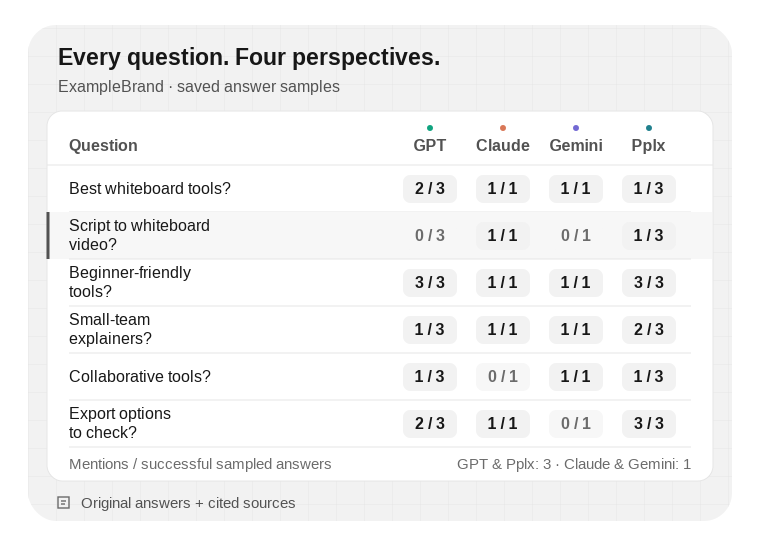
So verfolgen Sie Ihre Marke in ChatGPT

Wie verfolgst du die KI-Sichtbarkeit deiner Marke über die Zeit?

Sechs Käuferfragen. Vier Perspektiven.

FrageChatGPTClaudeGeminiPerplexity
Which tools help monitor brand visibility in AI search?2 / 31 / 11 / 11 / 3
How can I track brand mentions in ChatGPT answers?0 / 31 / 10 / 11 / 3
How can a new website check its AI search visibility?3 / 31 / 11 / 13 / 3
How can a small team review sources cited in AI answers?1 / 31 / 11 / 12 / 3
How should a team compare AI visibility monitoring tools?1 / 30 / 11 / 11 / 3
What sampling limits should I check in an AI visibility plan?2 / 31 / 10 / 13 / 3

Erwähnungen / gültige Antworten. Die Stichprobengröße variiert je nach Plattform.

Warum fehlt deine Marke möglicherweise in KI-Antworten?

Ein Google-Ranking garantiert keine KI-Erwähnung. Frage, Plattform, verfügbare Quellen und Zeitpunkt beeinflussen das Ergebnis. Eine fehlende Erwähnung ist Anlass, Belege zu prüfen, keine Diagnose deiner Website.

SEO und KI-Sichtbarkeit messen unterschiedliche Ergebnisse
VergleichSEOKI-Sichtbarkeit / GEO
Wo du erscheinstSeiten in SuchergebnissenMarkenerwähnungen und Quellenlinks in KI-Antworten
Was du misstSuchimpressionen, Klicks und PositionenErwähnungen und Zitate in erfolgreich erhobenen Antworten
Wichtiger KontextSuchanfrage, Markt, Gerät und ZeitpunktFrage, KI-Plattform, Markt, Sprache, Zeitpunkt und Stichprobenzahl
Was du untersuchstSeitenrelevanz und technischer ZugriffAntwortrelevanz, genannte Wettbewerber und tatsächlich zitierte Quellen

Website-Zugriff, Suchaufnahme, Markenerwähnungen, Empfehlungen und Zitate sind unterschiedliche Signale. Weder eine lesbare Website noch geänderte Inhalte garantieren eine KI-Empfehlung.
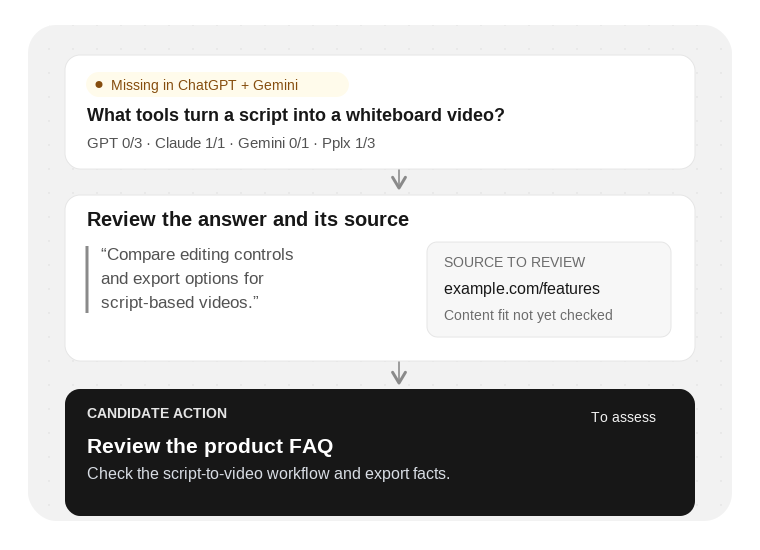
Wie werden Lücken in KI-Antworten zu Inhalten?
03VON DER BEOBACHTUNG ZUR AKTION

Wie werden Lücken in KI-Antworten zu Inhalten?

Prüfe die Belege und wähle den nächsten Schritt. In geeigneten bezahlten Tarifen kannst du einen Entwurf aus einer passenden Chance für die eigene Website, einer Korrektur oder einem eigenen Thema starten und die Angaben vor der Erstellung bestätigen.

  • Fehlende Erwähnungen und mögliche externe Quellen vor einer Entscheidung prüfen.
  • Entwürfe anhand gespeicherter Antworten und bestätigter Fakten prüfen und bearbeiten.
  • Markdown und HTML kopieren oder exportieren und selbst veröffentlichen.

Kontakthinweise zu externen Quellen bieten keine direkte Entwurfserstellung. Prüfe Fakten und Links selbst: Faktenprüfung und Veröffentlichung erfolgen nicht automatisch, keine Aktion garantiert KI-Erwähnungen oder Zitate.

Kostenlos starten. Bei Bedarf erweitern.

Der anonyme Check fragt 3 ChatGPT-Fragen einmalig ab. Free enthält 9 Monitoring-Fragen; bezahlte Tarife ergänzen tägliches ChatGPT, wöchentliches Perplexity und Entwürfe. Growth und Scale ergänzen eine gemeinsame Schwerpunktgruppe für Claude und Gemini. Alle Kontingente stehen unter Preise.

Pläne & Preise ansehen
05GUTE FRAGEN

Fragen zum ersten Check und den nächsten Schritten.

Verstehe den kostenlosen Umfang, deine Ergebnisse und den Unterschied zwischen SEO und KI-Sichtbarkeit.

Weitere Fragen und Antworten

Wie prüfe ich, ob ChatGPT meine Marke erwähnt?

Gib deine Website ein, prüfe drei vorgeschlagene Fragen und bestätige den kostenlosen Check. Jede Frage erhält eine ChatGPT-Antwort. Lies den Originaltext, um die Darstellung deiner Marke zu verstehen, statt jede Erwähnung als Empfehlung zu werten.

Was enthält der kostenlose Check?

Die anonyme Vorschau umfasst einen Website-Check und drei ChatGPT-Fragen mit je einer Antwort. Die ersten Ergebnisse kannst du ohne Anmeldung lesen. Der Website-Check prüft Zugriff und Lesbarkeit, beweist aber keine Aufnahme durch KI.

Woher kommen die vorgeschlagenen Fragen?

Aus deinen Website-Inhalten und einer ergänzten Produktbeschreibung. Wir wählen je eine Frage aus drei Absichtsgruppen vor; vor dem Start kannst du Alternativen derselben Gruppe wählen oder die Fragen bearbeiten. Ist die Website nicht lesbar, kannst du eine Kurzbeschreibung eingeben.

Welche KI-Plattformen kann ich beobachten?

Free beobachtet 9 Fragen nur mit ChatGPT alle 14 Tage; bezahlte Tarife nutzen ChatGPT täglich und Perplexity wöchentlich mit je 1 Antwort pro Frage, Plattform und Abfrage. Growth und Scale ergänzen Claude und Gemini alle 14 Tage mit je 1 Antwort pro ausgewählter Frage aus derselben Gruppe: 25 von 100 Fragen bei Growth oder 100 von 250 gemeinsam genutzten Fragen bei Scale, ohne zusätzliche Fragen oder getrennte Gruppen je Plattform. Google AI Overviews wird nicht unterstützt.

Was unterscheidet Erwähnung, Empfehlung und Zitat?

Eine Erwähnung nennt die Marke, eine Empfehlung befürwortet sie im Kontext und ein Zitat verlinkt eine Quellenseite. Die Erwähnungsrate zählt erfolgreich erhobene Antworten mit Markennennung, keine bestätigten Empfehlungen. Prüfe Original und Stichprobenzahl vor Schlussfolgerungen.

Was unterscheidet SEO und GEO?

SEO betrachtet Sichtbarkeit in Suchergebnissen; GEO untersucht, wie Marken und Quellen in KI-Antworten vorkommen. Nützliche, zugängliche Inhalte helfen beiden, doch Suchrankings belegen keine KI-Erwähnungen oder Zitate.

Was passiert nach Anmeldung und Speichern?

Melde dich an, um vorhandene Fragen und Antworten ohne erneute Abfrage zu speichern. Ergänze je 2 Fragen in den 3 Kategorien: 6 neue plus die ursprünglichen 3, insgesamt 9. Anmeldung oder Speichern führt die 9 Fragen nicht automatisch aus und aktiviert keinen Zeitplan.

Garantieren bessere Inhalte KI-Erwähnungen oder Zitate?

Nein. Inhaltsänderungen garantieren weder Erwähnungen noch Zitate oder Rankings in KI-Antworten. Promptvane hilft beim Prüfen von Belegen und erstellt in geeigneten Tarifen Entwürfe zum eigenen Bearbeiten und Exportieren. Vergleiche spätere Ergebnisse unter ähnlichen Bedingungen; eine geänderte Antwort beweist ihre Ursache nicht.

DEIN NÄCHSTER KUNDE STARTET VIELLEICHT MIT KI.

Finde heraus, wo deine Marke steht.

Drei Fragen prüfen. Je eine ChatGPT-Antwort erhalten. Erste Ergebnisse ohne Anmeldung.

Meine Marke kostenlos prüfen

Eine Antwort, die du genauer prüfen kannst.

ChatGPT · Which tools help monitor brand visibility in AI search?

A useful shortlist starts with your workflow rather than a single “best” tool.

In this simulated answer, Promptvane appears alongside Tool A and Tool B as an option to investigate for choosing an AI brand visibility monitoring tool. Metrics, answers and sources are simulated for this interface demonstration, not actual platform recommendations or measured results.

Compare the steps you would actually repeat: choosing questions, reviewing sampled answers, comparing mentions, and inspecting cited sources.

Use a short trial project to check the product information against your own needs. The answer can suggest a starting point, but the linked evidence is what you should verify.

BEISPIEL FÜR EIN QUELLENFORMAThttps://g2.com/https://zapier.com/