본문으로 이동

AI 가시성 모니터링 및 콘텐츠 개선

ChatGPT와 다른 AI가 내 브랜드를 언급하는지 확인하세요

구매자가 묻는 질문 3개를 검토하세요. 30초면 ChatGPT가 언급한 브랜드와 인용한 출처를 무료 보고서로 확인할 수 있습니다.

약 30초 무료 확인 · ChatGPT 질문 3개 · 가입 불필요

StrokeVideo 샘플 보고서

strokevideo.com · ChatGPT 검색 ·

미국 · 영어 · 질문과 답변은 영어 원문입니다.

받은 답변
3 / 3
브랜드 언급
1 / 3
브랜드 웹사이트 인용
1 / 3
답변에서 확인한 제품
  • VideoScribe · 답변 2 / 3개
  • Vyond · 답변 2 / 3개
  • Doodly · 답변 2 / 3개
  • StrokeVideo · 답변 1 / 3개
  • KinoDraw · 답변 1 / 3개
  • Baseink · 답변 1 / 3개
  • Whiteboard Video Maker · 답변 1 / 3개
  • Animaker · 답변 1 / 3개
  • Golpo AI · 답변 1 / 3개
  • Canva · 답변 1 / 3개
질문 1 · 제품군 추천Which free AI whiteboard video makers let me export without a watermark?언급됨

StrokeVideo — 언급됨

브랜드 웹사이트 인용: 예

함께 언급된 제품 · KinoDraw, Baseink 및 Whiteboard Video Maker

이 답변의 추천 내용

StrokeVideo if you want AI to create the entire video from a topic or script.

인용 출처 · 7개

출처 4개 더 보기
전체 원문 답변

Yes! There are a few options that let you create whiteboard animation videos for free and download them without a watermark. The catch is that some limit the number of videos, length, or AI credits.

Here are the ones I'd look at first, based on their advertised free features in November 2026.

Best free AI whiteboard video makers

1. StrokeVideo

(Best overall)

  • Free: 1 video per day
  • No watermark on MP4 exports
  • Generates illustrations, script and narration using AI
  • Multiple drawing styles and languages
  • Free videos have a duration limit

Best for: YouTube explainers, educational videos and narrated presentations.

Try StrokeVideo


2. KinoDraw

(Free and open source)

  • Free desktop software
  • No watermark (you can disable its end card)
  • Turns scripts into hand-drawn explainer videos
  • Works offline

Best for: Making whiteboard videos without paying for a subscription.

Download KinoDraw


3. Baseink

(Free no-watermark export)

  • Advertises free no-watermark downloads
  • Whiteboard-style scene editor
  • Landscape, square and portrait formats
  • AI script and voiceover features are associated with Pro

Best for: Building and editing your own whiteboard scenes.

Try Baseink


4. Whiteboard Video Maker

  • Completely free
  • No watermark
  • No account required for basic use
  • Exports WebM video or GIF, rather than MP4

Best for: Simple whiteboard drawings and narrated animations.

View tool and export details

Tools that are free but add watermarks

These are popular, but I wouldn't choose them if watermark-free downloads are essential:

ToolFree export
AnimakerWatermarked
PowtoonWatermarked
VideoScribeTrial restrictions
RenderforestWatermarked
WhiteboardAnimation.aiWatermarked

Sources: www.genpixy.comwhiteboardanimation.aiwhiteboardanimation.ai

My recommendation

I'd start with:

  1. StrokeVideo if you want AI to create the entire video from a topic or script.
  2. KinoDraw if you want a genuinely free desktop solution.
  3. Baseink if you want more control over individual scenes.

One important distinction: watermark-free doesn't necessarily mean unrestricted commercial use. Check each tool's licensing terms before monetizing your videos.

One question so I can narrow it down

What type of whiteboard videos are you trying to create?

1. What kind of creation do you want?

AI creates everything from my script

Animated hand drawing illustrations

Whiteboard with a realistic drawing hand

Cartoon characters and explainer animations


2. Where will you publish the videos?

YouTube (landscape)

YouTube Shorts / TikTok

Online courses / education

Business marketing

[Find my best tools]

질문 2 · 선택 조건What are the best AI whiteboard tools for explainer videos?언급되지 않음

StrokeVideo — 언급되지 않음

브랜드 웹사이트 인용: 아니요

함께 언급된 제품 · VideoScribe, Animaker, Golpo AI, Vyond 및 Doodly

인용 출처 · 13개

출처 10개 더 보기
전체 원문 답변

The best AI whiteboard tools for explainer videos depend on whether you want AI to generate the entire video automatically or want to create traditional whiteboard animations where a hand draws illustrations as the narration plays.

For 2026, I'd shortlist VideoScribe, Animaker, Golpo AI, Vyond, and Doodly.

Here are my recommendations, ranked by use case.

Best AI whiteboard video tools

1. VideoScribe

(Best overall for classic whiteboard videos)

  • Traditional hand-drawn animation.
  • AI script generation, AI images and voiceovers.
  • Large library of illustrations and icons.
  • Good control over drawing speed and scene timing.

Best for: Educational videos, tutorials and YouTube explainers.

Website: VideoScribe. www.videoscribe.cowhiteboardanimation.aigeekchamp.com


2. Animaker

(Best all-around AI animation platform)

  • AI-assisted video creation.
  • Whiteboard animation and character animation.
  • Templates, voiceovers and illustrations.
  • More flexibility than traditional whiteboard software.

Best for: Marketing explainers, educational content and business videos.

Website: Animaker. www.itechguides.comwww.itechguides.comeasyimate.com


3. Golpo AI

(Best for automatic AI-generated explainers)

  • Generates videos from prompts or documents.
  • AI-generated scripts and narration.
  • Whiteboard-style drawings.
  • Frame-by-frame editing with prompts.

Best for: Turning articles, educational material and concepts into videos quickly.

Website: Golpo AI. clipflux.aitrychasca.com


4. Vyond

(Best for professional business explainers)

  • AI-assisted script-to-video creation.
  • Professional animated characters.
  • Whiteboard-style animation.
  • Business-oriented templates and branding.

Best for: Corporate training, SaaS explainers and professional presentations.

Website: Vyond. www.itechguides.comeasyimate.com


5. Doodly

(Best for traditional doodle animation)

  • Hand-drawn illustrations.
  • Large collection of characters and props.
  • Control over drawing sequences.
  • Desktop-based editing.

Best for: Simple, engaging whiteboard storytelling.

Website: Doodly. whiteboardanimation.aigeekchamp.com

Quick comparison

ToolAI automationHand-drawing effectBest use
VideoScribePartialYesClassic explainers
AnimakerHighWhiteboard styleVersatile videos
Golpo AIHighYesAutomated explainers
VyondHighWhiteboard styleBusiness videos
DoodlyLowYesDoodle storytelling

One important distinction: AI-generated whiteboard illustrations aren't necessarily the same as the traditional animation effect where a hand physically draws each illustration on screen.

My recommendation

I'd narrow it down to three:

  • VideoScribe: If you want the authentic whiteboard drawing experience.
  • Golpo AI: If you want to enter a topic or upload a document and have AI create most of the explainer.
  • Animaker: If you want a combination of AI, whiteboard animation and more conventional animated videos.

Let me narrow it down to the best tool for your project

What kind of explainer videos are you planning to create?

1. How do you want to create the videos?

AI creates the entire video from a prompt or script

I create scenes, with AI helping

I want complete manual control


2. What are the videos for?

Educational / YouTube videos

Business / Marketing explainers

Online courses and tutorials

Social media / Short videos


3. Monthly budget?

Free

Under $20/month

$20–$50/month

$50–$100/month

More than $100/month


4. What visual style do you prefer?

Traditional whiteboard with a hand drawing illustrations

Modern AI-generated illustrations and diagrams

Cartoon characters and storytelling

A combination of all three

[Find my best tools]

질문 3 · 사용 시나리오How can I make a whiteboard explainer video from a written script?언급되지 않음

StrokeVideo — 언급되지 않음

브랜드 웹사이트 인용: 아니요

함께 언급된 제품 · VideoScribe, Doodly, Vyond 및 Canva

인용 출처 · 6개

출처 3개 더 보기
전체 원문 답변

You can turn a written script into a whiteboard explainer video by converting the script into a visual storyboard, adding hand-drawn illustrations, recording a voiceover, and synchronizing the drawings with the narration.

You don't need animation or video-editing experience. There are tools that can automate much of the process.

1. The process: From script to finished video

Step 1. Break your script into scenes

Divide the script into short sections. Each section should communicate one main idea.


Step 2. Create illustrations

Choose simple drawings, icons, arrows, characters, diagrams, and keywords that represent each section.


Step 3. Animate the drawings

Use software to simulate a hand drawing illustrations onto a whiteboard.


Step 4. Add narration

Record your voice or use an AI-generated voice to read your script.


Step 5. Synchronize and export

Match the drawings to the narration, add background music if appropriate, and export your video.

2. Software you can use

Here are some popular options:

VideoScribe

Excellent for traditional whiteboard animations with a hand drawing effect. Good for turning scripts into illustrated scenes.

Visit VideoScribe


Doodly

Designed for drag-and-drop doodle animations. Useful if you don't want to draw illustrations yourself.

Visit Doodly


Vyond

Better for character-driven animated explainers, business presentations, and storytelling.

Visit Vyond


Canva

Beginner-friendly for combining illustrations, text, narration, and simple animations. Less focused on authentic hand-drawing effects.

Visit Canva

3. Example: Converting a script into a storyboard

Suppose your script says:

"Every successful business starts with a problem that needs solving. The challenge is finding the right solution and delivering value to customers."

You could visualize it like this:

Scene 1: The problem

Draw a person with a question mark above their head.

Scene 2: The solution

Draw a light bulb appearing with rays of light.

Scene 3: Delivering value

Draw two people shaking hands.

Scene 4: Success

Draw an upward graph showing business growth.

The narration continues while each illustration is drawn onto the screen.

4. My recommended workflow

For a straightforward project, I'd recommend:

  1. Start with your written script.
  2. Use ChatGPT to break it into scenes and suggest illustrations.
  3. Use VideoScribe to assemble and animate the scenes.
  4. Generate or record the narration.
  5. Synchronize everything and export as an MP4.

VideoScribe documents this entire workflow, including AI voiceovers, scene timing, and HD export. www.videoscribe.cowww.videoscribe.co

5. I can help you turn your actual script into a video plan

If you already have a written script, you can paste it here.

I can help transform it into:

  • Scene-by-scene storyboard: What appears on screen for every part of the narration.
  • Illustration instructions: Exactly what should be drawn.
  • Animation directions: When drawings appear, move, or disappear.
  • Voiceover timing: How to synchronize narration with the visuals.
  • Production instructions: How to assemble the finished video in your chosen software.

One question: What kind of whiteboard explainer are you looking to create?

1. Preferred visual style

Traditional whiteboard with drawing hand

Modern colorful whiteboard animation

Professional business explainer


2. Approximate video length

1–2 minutes

3–5 minutes

5–10 minutes

10+ minutes


3. Narration

AI-generated voice

My own recorded voice

No narration

[Continue]

You can also paste your script directly, and we can start turning it into a storyboard.

웹사이트 확인 세부 정보

웹사이트 본문을 읽었습니다

strokevideo.com에서 읽은 페이지

Promptvane이란?

Promptvane은 ChatGPT, Claude, Gemini, Perplexity의 AI 가시성을 모니터링하고 콘텐츠를 개선하는 플랫폼입니다. 브랜드 언급과 경쟁사를 비교하고 인용 출처를 살펴보며, 적합한 기회를 콘텐츠 초안으로 바꿉니다. 무료 사이트 검사와 ChatGPT 질문 3개로 시작하세요. Free는 ChatGPT를 지속 관찰하고, 업그레이드하면 더 많은 플랫폼과 한도, 초안을 이용할 수 있습니다.

무료 ChatGPT 가시성 확인은 어떻게 하나요?

답변을 요청하기 전에 질문을 검토합니다. 빈 입력창 대신 내 사이트에서 시작하세요.

  1. 사이트 입력

    사이트를 읽고 관련 구매자 질문을 제안합니다. 더 자세한 맥락이 필요하면 짧은 제품 설명을 추가할 수 있습니다.

  2. 질문 3개 검토

    브랜드, 대상 시장, 언어를 확인하세요. 확인을 시작하기 전에 다른 추천 질문으로 바꾸거나 3개 질문을 수정할 수 있습니다.

  3. ChatGPT 답변 확인

    질문당 답변 1개를 받습니다. 로그인 없이 브랜드 언급과 원문, 이용 가능한 출처를 확인하세요.

질문 3개, 질문당 답변 1개. 로그인해 결과를 저장할 수 있으며 저장만으로 다시 실행하지 않습니다.

4개 플랫폼, 각각의 독립된 답변.
Promptvane · 제품 데모 · 질문 6개미국 · 영어
9/18브랜드 언급
2예시 출처

Which tools help monitor brand visibility in AI search?

A useful shortlist starts with your workflow rather than a single “best” tool.

In this simulated answer, Promptvane appears alongside Tool A and Tool B as an option to investigate for choosing an AI brand visibility monitoring tool. Metrics, answers and sources are simulated for this interface demonstration, not actual platform recommendations or measured results.

Compare the steps you would actually repeat: choosing questions, reviewing sampled answers, comparing mentions, and inspecting cited sources.

Use a short trial project to check the product information against your own needs. The answer can suggest a starting point, but the linked evidence is what you should verify.

출처g2.comzapier.com
1 / 6

4개 AI 플랫폼에서 브랜드를 추적하세요.

ChatGPTClaudeGeminiPerplexity

Free는 ChatGPT, Starter는 Perplexity도 포함합니다. 유료 플랜은 ChatGPT를 매일, Perplexity를 매주 실행해 질문당 답변 1개를 받습니다. Growth와 Scale은 Claude와 Gemini도 포함하지만 전체 질문이 아닌 공통 중점 질문 그룹만 실행합니다.

01답변 전체를 확인하세요

AI 답변에서 무엇을 알 수 있을까요?

내 브랜드와 어떤 경쟁사가 등장하는지, 실제 답변은 무엇인지 확인하세요. 원문과 인용 링크를 살펴보세요. 언급이 꼭 추천을 뜻하지는 않으며, 인용은 출처로 연결되는 링크입니다.

고객이 할 수 있는 질문

Which tools help monitor brand visibility in AI search?

위의 플랫폼 탭과 질문 전환 버튼으로 같은 구매 상황의 답변 예시를 살펴보세요.

미국 · 영어

In this simulated answer, Promptvane appears alongside Tool A and Tool B as an option to investigate for choosing an AI brand visibility monitoring tool. Metrics, answers and sources are simulated for this interface demonstration, not actual platform recommendations or measured results.

현재 질문
2/ 3

개 표본 답변에서 브랜드를 언급했습니다

답변 원문인용 출처명확한 표본 수시장 및 언어 조건
02중요한 질문을 모니터링하세요

브랜드의 AI 가시성을 꾸준히 추적하려면?

사업에 중요한 질문을 저장하고 모니터링을 설정해 시간에 따라 답변을 비교하세요. Free: 사이트 1개, 모니터링 질문 9개. ChatGPT에서 14일마다 질문당 답변 1개를 받으며 다른 엔진이나 콘텐츠 초안은 포함되지 않습니다.

  • 질문, 대상 시장, 언어를 선택하세요.
  • 브랜드 언급, 경쟁사, 인용 출처를 확인하세요.
  • 플랫폼과 성공 샘플 수를 보며 실행 결과를 비교하세요.

ChatGPT에서 브랜드를 모니터링하는 방법

브랜드의 AI 가시성을 꾸준히 추적하려면?

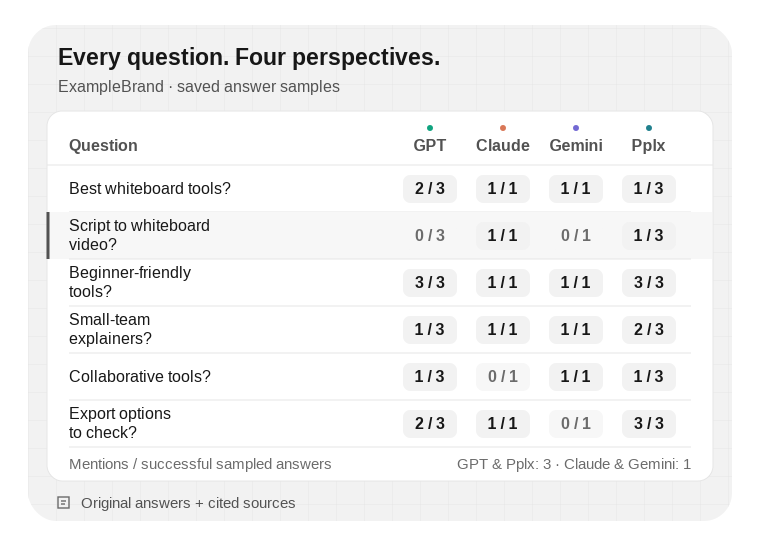
구매자의 질문 6개, 플랫폼별 4가지 관점.

질문ChatGPTClaudeGeminiPerplexity
Which tools help monitor brand visibility in AI search?2 / 31 / 11 / 11 / 3
How can I track brand mentions in ChatGPT answers?0 / 31 / 10 / 11 / 3
How can a new website check its AI search visibility?3 / 31 / 11 / 13 / 3
How can a small team review sources cited in AI answers?1 / 31 / 11 / 12 / 3
How should a team compare AI visibility monitoring tools?1 / 30 / 11 / 11 / 3
What sampling limits should I check in an AI visibility plan?2 / 31 / 10 / 13 / 3

언급 수 / 유효 답변 수. 플랫폼마다 표본 수가 다릅니다.

AI 답변에 내 브랜드가 나오지 않는 이유는?

Google 순위가 AI 언급을 보장하지는 않습니다. 질문, 플랫폼, 이용 가능한 출처, 확인 시점이 모두 결과에 영향을 줍니다. 한 번 언급되지 않은 것은 증거를 살펴볼 이유이지 사이트 문제의 진단은 아닙니다.

SEO와 AI 가시성은 서로 다른 결과를 측정합니다
비교 항목SEOAI 가시성 / GEO
등장 위치검색 결과에 표시되는 페이지AI 답변의 브랜드 언급과 출처 링크
측정 대상검색 노출, 클릭, 순위성공적으로 수집한 답변의 언급과 인용
비교 조건검색어, 시장, 기기, 시간질문, AI 플랫폼, 시장, 언어, 시간, 샘플 수
살펴볼 내용페이지 관련성과 기술적 접근성답변 관련성, 등장한 경쟁사, 실제 인용 출처

사이트 접근, 검색 수록, 브랜드 언급, 추천, 인용은 서로 다른 신호입니다. 사이트를 읽을 수 있거나 콘텐츠를 수정했다고 AI 추천이 보장되지는 않습니다.
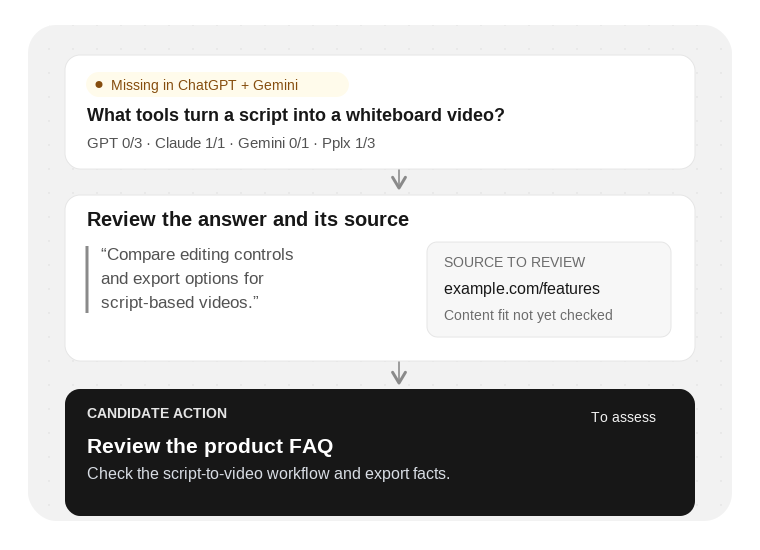
AI 답변의 빈틈을 콘텐츠로 바꾸려면?
03관찰에서 다음 행동으로

AI 답변의 빈틈을 콘텐츠로 바꾸려면?

증거를 검토한 뒤 다음 행동을 선택하세요. 해당 유료 플랜에서는 적합한 자사 사이트 또는 정정 기회, 혹은 직접 고른 주제로 초안을 시작하고 생성 전에 내용을 확인할 수 있습니다.

  • 누락된 언급과 외부 출처 후보를 살펴본 뒤 행동을 결정하세요.
  • 저장된 답변과 확인한 사실을 바탕으로 초안을 검토하고 수정하세요.
  • Markdown과 HTML로 복사하거나 내보내 직접 사이트에 게시하세요.

외부 출처에 연락할 후보에서는 바로 초안을 만들 수 없습니다. 사실과 링크는 직접 확인하세요. 자동 사실 확인이나 게시는 없으며 어떤 행동도 AI 언급이나 인용을 보장하지 않습니다.

무료로 시작하고 필요할 때 확장하세요.

익명 체험은 ChatGPT 질문 3개를 1회 확인합니다. Free는 모니터링 질문 9개, 유료 플랜은 매일 ChatGPT, 매주 Perplexity와 초안을 제공합니다. Growth와 Scale은 Claude와 Gemini의 공통 중점 질문 그룹을 추가합니다. 자세한 한도는 요금을 확인하세요.

요금제와 가격 보기
05자주 묻는 질문

첫 확인과 그다음 단계에 관한 질문.

무료 범위, 결과, SEO와 AI 가시성의 차이를 알아보세요.

다른 질문과 답변 보기

ChatGPT가 내 브랜드를 언급하는지 어떻게 확인하나요?

사이트를 입력하고 추천 질문 3개를 검토한 뒤 무료 확인을 시작하세요. 질문당 ChatGPT 답변 1개를 받습니다. 모든 언급을 추천으로 간주하지 말고, 원문에서 브랜드가 어떻게 설명되는지 확인하세요.

무료 확인에는 무엇이 포함되나요?

익명 체험에는 사이트 검사와 ChatGPT 질문 3개가 포함되며 질문당 답변 1개를 받습니다. 첫 결과는 가입 없이 읽을 수 있습니다. 사이트 검사는 접근성과 가독성을 평가하며 AI가 사이트를 수록했다는 증거는 아닙니다.

추천 질문은 어디에서 나오나요?

사이트 콘텐츠와 제공한 제품 설명을 바탕으로 만듭니다. 3개 의도 그룹에서 질문 1개씩을 미리 선택하며, 시작 전에 같은 그룹의 다른 후보로 바꾸거나 수정할 수 있습니다. 사이트를 읽지 못하면 짧은 설명을 제공할 수 있습니다.

어떤 AI 플랫폼을 모니터링할 수 있나요?

Free는 ChatGPT에서만 질문 9개를 14일마다 확인하며, 유료 플랜은 ChatGPT를 매일, Perplexity를 매주 실행해 플랫폼별로 질문당 답변 1개를 받습니다. Growth와 Scale은 Claude와 Gemini에서도 14일마다 같은 중점 질문 그룹으로 질문당 답변 1개를 받습니다. Growth는 100개 중 25개, Scale은 전체 사이트가 공유하는 250개 중 100개로, 추가 질문이나 플랫폼별 별도 그룹이 아니며 Google AI Overviews는 지원하지 않습니다.

언급, 추천, 인용은 어떻게 다른가요?

언급은 브랜드 이름이 나오는 것, 추천은 맥락상 권하는 것, 인용은 출처 페이지로 연결하는 것입니다. 언급률은 성공적으로 수집한 답변 중 브랜드가 등장한 비율이며 확인된 추천 비율이 아닙니다. 원문과 샘플 수를 보고 판단하세요.

SEO와 GEO의 차이는 무엇인가요?

SEO는 검색 결과의 가시성, GEO는 AI가 생성한 답변에 브랜드와 출처가 어떻게 등장하는지에 집중합니다. 유용하고 접근 가능한 콘텐츠라는 공통점은 있지만 검색 순위로 AI 언급이나 인용을 입증할 수는 없습니다.

로그인해 결과를 저장하면 어떻게 되나요?

로그인하면 기존 질문과 답변을 다시 실행하지 않고 저장합니다. 3개 범주마다 질문 2개씩, 새 질문 6개를 추가해 기존 3개와 합쳐 총 9개가 됩니다. 로그인하거나 저장해도 9개 질문을 자동 실행하거나 예약 모니터링을 켜지 않습니다.

콘텐츠를 개선하면 AI 언급이나 인용이 보장되나요?

아니요. 콘텐츠 수정은 AI 답변의 언급, 인용, 순위를 보장하지 않습니다. Promptvane은 증거 검토를 돕고 해당 플랜에서는 직접 편집하고 내보낼 초안을 만들 수 있습니다. 비슷한 조건에서 후속 결과를 비교하세요. 답변 변화만으로 원인을 입증할 수는 없습니다.

다음 고객은 AI에서 시작할 수도 있습니다.

브랜드가 어디에 등장하는지 확인하세요.

질문 3개를 검토하고 질문당 ChatGPT 답변 1개를 받으세요. 첫 결과는 가입 없이 확인할 수 있습니다.

내 브랜드 무료 확인

자세히 확인할 수 있는 답변.

ChatGPT · Which tools help monitor brand visibility in AI search?

A useful shortlist starts with your workflow rather than a single “best” tool.

In this simulated answer, Promptvane appears alongside Tool A and Tool B as an option to investigate for choosing an AI brand visibility monitoring tool. Metrics, answers and sources are simulated for this interface demonstration, not actual platform recommendations or measured results.

Compare the steps you would actually repeat: choosing questions, reviewing sampled answers, comparing mentions, and inspecting cited sources.

Use a short trial project to check the product information against your own needs. The answer can suggest a starting point, but the linked evidence is what you should verify.

출처 형식 예시https://g2.com/https://zapier.com/