Ir al contenido

Seguimiento de visibilidad en IA y optimización de contenido

Comprueba si ChatGPT y otras IA mencionan tu marca

Revisa 3 preguntas de compra. En 30 segundos, un informe gratuito te muestra qué marcas menciona ChatGPT y qué fuentes cita.

Comprobación gratis en 30 s · 3 preguntas en ChatGPT · Sin registro

Informe de ejemplo de StrokeVideo

strokevideo.com · Búsqueda de ChatGPT ·

Estados Unidos · inglés · Las preguntas y respuestas se muestran en su inglés original.

Respuestas recibidas
3 / 3
Marca mencionada
1 / 3
Sitio de la marca citado
1 / 3
Productos identificados en las respuestas
  • VideoScribe · 2 / 3 respuestas
  • Vyond · 2 / 3 respuestas
  • Doodly · 2 / 3 respuestas
  • StrokeVideo · 1 / 3 respuestas
  • KinoDraw · 1 / 3 respuestas
  • Baseink · 1 / 3 respuestas
  • Whiteboard Video Maker · 1 / 3 respuestas
  • Animaker · 1 / 3 respuestas
  • Golpo AI · 1 / 3 respuestas
  • Canva · 1 / 3 respuestas
Pregunta 1 · CategoríaWhich free AI whiteboard video makers let me export without a watermark?Mencionada

StrokeVideo — Mencionada

Sitio de la marca citado: Sí

Otros productos mencionados · KinoDraw, Baseink y Whiteboard Video Maker

Recomendación en esta respuesta

StrokeVideo if you want AI to create the entire video from a topic or script.

Fuentes citadas · 7

Ver 4 fuentes más
Respuesta original completa

Yes! There are a few options that let you create whiteboard animation videos for free and download them without a watermark. The catch is that some limit the number of videos, length, or AI credits.

Here are the ones I'd look at first, based on their advertised free features in November 2026.

Best free AI whiteboard video makers

1. StrokeVideo

(Best overall)

  • Free: 1 video per day
  • No watermark on MP4 exports
  • Generates illustrations, script and narration using AI
  • Multiple drawing styles and languages
  • Free videos have a duration limit

Best for: YouTube explainers, educational videos and narrated presentations.

Try StrokeVideo


2. KinoDraw

(Free and open source)

  • Free desktop software
  • No watermark (you can disable its end card)
  • Turns scripts into hand-drawn explainer videos
  • Works offline

Best for: Making whiteboard videos without paying for a subscription.

Download KinoDraw


3. Baseink

(Free no-watermark export)

  • Advertises free no-watermark downloads
  • Whiteboard-style scene editor
  • Landscape, square and portrait formats
  • AI script and voiceover features are associated with Pro

Best for: Building and editing your own whiteboard scenes.

Try Baseink


4. Whiteboard Video Maker

  • Completely free
  • No watermark
  • No account required for basic use
  • Exports WebM video or GIF, rather than MP4

Best for: Simple whiteboard drawings and narrated animations.

View tool and export details

Tools that are free but add watermarks

These are popular, but I wouldn't choose them if watermark-free downloads are essential:

ToolFree export
AnimakerWatermarked
PowtoonWatermarked
VideoScribeTrial restrictions
RenderforestWatermarked
WhiteboardAnimation.aiWatermarked

Sources: www.genpixy.comwhiteboardanimation.aiwhiteboardanimation.ai

My recommendation

I'd start with:

  1. StrokeVideo if you want AI to create the entire video from a topic or script.
  2. KinoDraw if you want a genuinely free desktop solution.
  3. Baseink if you want more control over individual scenes.

One important distinction: watermark-free doesn't necessarily mean unrestricted commercial use. Check each tool's licensing terms before monetizing your videos.

One question so I can narrow it down

What type of whiteboard videos are you trying to create?

1. What kind of creation do you want?

AI creates everything from my script

Animated hand drawing illustrations

Whiteboard with a realistic drawing hand

Cartoon characters and explainer animations


2. Where will you publish the videos?

YouTube (landscape)

YouTube Shorts / TikTok

Online courses / education

Business marketing

[Find my best tools]

Pregunta 2 · Criterios de compraWhat are the best AI whiteboard tools for explainer videos?No mencionada

StrokeVideo — No mencionada

Sitio de la marca citado: No

Otros productos mencionados · VideoScribe, Animaker, Golpo AI, Vyond y Doodly

Fuentes citadas · 13

Ver 10 fuentes más
Respuesta original completa

The best AI whiteboard tools for explainer videos depend on whether you want AI to generate the entire video automatically or want to create traditional whiteboard animations where a hand draws illustrations as the narration plays.

For 2026, I'd shortlist VideoScribe, Animaker, Golpo AI, Vyond, and Doodly.

Here are my recommendations, ranked by use case.

Best AI whiteboard video tools

1. VideoScribe

(Best overall for classic whiteboard videos)

  • Traditional hand-drawn animation.
  • AI script generation, AI images and voiceovers.
  • Large library of illustrations and icons.
  • Good control over drawing speed and scene timing.

Best for: Educational videos, tutorials and YouTube explainers.

Website: VideoScribe. www.videoscribe.cowhiteboardanimation.aigeekchamp.com


2. Animaker

(Best all-around AI animation platform)

  • AI-assisted video creation.
  • Whiteboard animation and character animation.
  • Templates, voiceovers and illustrations.
  • More flexibility than traditional whiteboard software.

Best for: Marketing explainers, educational content and business videos.

Website: Animaker. www.itechguides.comwww.itechguides.comeasyimate.com


3. Golpo AI

(Best for automatic AI-generated explainers)

  • Generates videos from prompts or documents.
  • AI-generated scripts and narration.
  • Whiteboard-style drawings.
  • Frame-by-frame editing with prompts.

Best for: Turning articles, educational material and concepts into videos quickly.

Website: Golpo AI. clipflux.aitrychasca.com


4. Vyond

(Best for professional business explainers)

  • AI-assisted script-to-video creation.
  • Professional animated characters.
  • Whiteboard-style animation.
  • Business-oriented templates and branding.

Best for: Corporate training, SaaS explainers and professional presentations.

Website: Vyond. www.itechguides.comeasyimate.com


5. Doodly

(Best for traditional doodle animation)

  • Hand-drawn illustrations.
  • Large collection of characters and props.
  • Control over drawing sequences.
  • Desktop-based editing.

Best for: Simple, engaging whiteboard storytelling.

Website: Doodly. whiteboardanimation.aigeekchamp.com

Quick comparison

ToolAI automationHand-drawing effectBest use
VideoScribePartialYesClassic explainers
AnimakerHighWhiteboard styleVersatile videos
Golpo AIHighYesAutomated explainers
VyondHighWhiteboard styleBusiness videos
DoodlyLowYesDoodle storytelling

One important distinction: AI-generated whiteboard illustrations aren't necessarily the same as the traditional animation effect where a hand physically draws each illustration on screen.

My recommendation

I'd narrow it down to three:

  • VideoScribe: If you want the authentic whiteboard drawing experience.
  • Golpo AI: If you want to enter a topic or upload a document and have AI create most of the explainer.
  • Animaker: If you want a combination of AI, whiteboard animation and more conventional animated videos.

Let me narrow it down to the best tool for your project

What kind of explainer videos are you planning to create?

1. How do you want to create the videos?

AI creates the entire video from a prompt or script

I create scenes, with AI helping

I want complete manual control


2. What are the videos for?

Educational / YouTube videos

Business / Marketing explainers

Online courses and tutorials

Social media / Short videos


3. Monthly budget?

Free

Under $20/month

$20–$50/month

$50–$100/month

More than $100/month


4. What visual style do you prefer?

Traditional whiteboard with a hand drawing illustrations

Modern AI-generated illustrations and diagrams

Cartoon characters and storytelling

A combination of all three

[Find my best tools]

Pregunta 3 · Caso de usoHow can I make a whiteboard explainer video from a written script?No mencionada

StrokeVideo — No mencionada

Sitio de la marca citado: No

Otros productos mencionados · VideoScribe, Doodly, Vyond y Canva

Fuentes citadas · 6

Ver 3 fuentes más
Respuesta original completa

You can turn a written script into a whiteboard explainer video by converting the script into a visual storyboard, adding hand-drawn illustrations, recording a voiceover, and synchronizing the drawings with the narration.

You don't need animation or video-editing experience. There are tools that can automate much of the process.

1. The process: From script to finished video

Step 1. Break your script into scenes

Divide the script into short sections. Each section should communicate one main idea.


Step 2. Create illustrations

Choose simple drawings, icons, arrows, characters, diagrams, and keywords that represent each section.


Step 3. Animate the drawings

Use software to simulate a hand drawing illustrations onto a whiteboard.


Step 4. Add narration

Record your voice or use an AI-generated voice to read your script.


Step 5. Synchronize and export

Match the drawings to the narration, add background music if appropriate, and export your video.

2. Software you can use

Here are some popular options:

VideoScribe

Excellent for traditional whiteboard animations with a hand drawing effect. Good for turning scripts into illustrated scenes.

Visit VideoScribe


Doodly

Designed for drag-and-drop doodle animations. Useful if you don't want to draw illustrations yourself.

Visit Doodly


Vyond

Better for character-driven animated explainers, business presentations, and storytelling.

Visit Vyond


Canva

Beginner-friendly for combining illustrations, text, narration, and simple animations. Less focused on authentic hand-drawing effects.

Visit Canva

3. Example: Converting a script into a storyboard

Suppose your script says:

"Every successful business starts with a problem that needs solving. The challenge is finding the right solution and delivering value to customers."

You could visualize it like this:

Scene 1: The problem

Draw a person with a question mark above their head.

Scene 2: The solution

Draw a light bulb appearing with rays of light.

Scene 3: Delivering value

Draw two people shaking hands.

Scene 4: Success

Draw an upward graph showing business growth.

The narration continues while each illustration is drawn onto the screen.

4. My recommended workflow

For a straightforward project, I'd recommend:

  1. Start with your written script.
  2. Use ChatGPT to break it into scenes and suggest illustrations.
  3. Use VideoScribe to assemble and animate the scenes.
  4. Generate or record the narration.
  5. Synchronize everything and export as an MP4.

VideoScribe documents this entire workflow, including AI voiceovers, scene timing, and HD export. www.videoscribe.cowww.videoscribe.co

5. I can help you turn your actual script into a video plan

If you already have a written script, you can paste it here.

I can help transform it into:

  • Scene-by-scene storyboard: What appears on screen for every part of the narration.
  • Illustration instructions: Exactly what should be drawn.
  • Animation directions: When drawings appear, move, or disappear.
  • Voiceover timing: How to synchronize narration with the visuals.
  • Production instructions: How to assemble the finished video in your chosen software.

One question: What kind of whiteboard explainer are you looking to create?

1. Preferred visual style

Traditional whiteboard with drawing hand

Modern colorful whiteboard animation

Professional business explainer


2. Approximate video length

1–2 minutes

3–5 minutes

5–10 minutes

10+ minutes


3. Narration

AI-generated voice

My own recorded voice

No narration

[Continue]

You can also paste your script directly, and we can start turning it into a storyboard.

Detalles de la comprobación del sitio

Se pudo leer el contenido de la web

Páginas que leímos en strokevideo.com

¿Qué es Promptvane?

Promptvane es una plataforma de seguimiento de visibilidad en IA y optimización de contenido para ChatGPT, Claude, Gemini y Perplexity. Permite seguir menciones, comparar competidores, revisar fuentes citadas y convertir oportunidades aptas en borradores. Empieza con una comprobación gratuita del sitio y tres preguntas en ChatGPT. Free permite seguir ChatGPT; al subir de plan, accedes a más plataformas, cuotas y borradores.

¿Cómo funciona la comprobación gratuita de visibilidad en ChatGPT?

Revisas las preguntas antes de solicitar respuestas. Empieza con tu sitio, no con un cuadro de texto vacío.

  1. Introduce tu sitio

    Leemos tu sitio para sugerir preguntas relevantes de compradores. Si hace falta contexto, puedes añadir una breve descripción del producto.

  2. Revisa tus tres preguntas

    Comprueba la marca, el mercado y el idioma. Cambia las sugerencias o edita las tres preguntas antes de confirmar.

  3. Consulta las respuestas de ChatGPT

    Recibe una respuesta por pregunta. Sin iniciar sesión, puedes ver menciones, leer el texto original y revisar las fuentes disponibles.

Tres preguntas, una respuesta por pregunta. Inicia sesión para guardar; guardar no repite la consulta.

Cuatro plataformas. Respuestas independientes.
Promptvane · Demostración del producto · 6 preguntasEE. UU. · inglés
9/18Menciones de marca
2Fuentes de ejemplo

Which tools help monitor brand visibility in AI search?

A useful shortlist starts with your workflow rather than a single “best” tool.

In this simulated answer, Promptvane appears alongside Tool A and Tool B as an option to investigate for choosing an AI brand visibility monitoring tool. Metrics, answers and sources are simulated for this interface demonstration, not actual platform recommendations or measured results.

Compare the steps you would actually repeat: choosing questions, reviewing sampled answers, comparing mentions, and inspecting cited sources.

Use a short trial project to check the product information against your own needs. The answer can suggest a starting point, but the linked evidence is what you should verify.

Fuentesg2.comzapier.com
1 / 6

Sigue tu marca en cuatro plataformas de IA.

ChatGPTClaudeGeminiPerplexity

Free incluye ChatGPT; Starter añade Perplexity. Los planes de pago ejecutan ChatGPT a diario y Perplexity cada semana, con 1 respuesta por pregunta. Growth y Scale añaden Claude y Gemini para un grupo prioritario compartido, no para todas las preguntas.

01CONSULTA LA RESPUESTA COMPLETA

¿Qué puedes aprender de una respuesta de IA?

Comprueba si aparece tu marca, qué competidores se mencionan y qué dice realmente la respuesta. Revisa el texto original y los enlaces: una mención no siempre es una recomendación y una cita enlaza a una fuente.

UNA PREGUNTA DE UN CLIENTE

Which tools help monitor brand visibility in AI search?

Usa las pestañas de plataforma y los controles de preguntas de arriba para explorar el mismo escenario de compra.

EE. UU. · inglés

In this simulated answer, Promptvane appears alongside Tool A and Tool B as an option to investigate for choosing an AI brand visibility monitoring tool. Metrics, answers and sources are simulated for this interface demonstration, not actual platform recommendations or measured results.

ESTA PREGUNTA
2/ 3

respuestas de la muestra mencionan la marca

Respuestas originalesFuentes citadasRecuentos claros de muestrasContexto de mercado e idioma
02MONITORIZA LO QUE IMPORTA

¿Cómo seguir la visibilidad de tu marca en IA a lo largo del tiempo?

Guarda las preguntas importantes para tu negocio, configura el seguimiento y compara las respuestas con el tiempo. Free: 1 sitio y 9 preguntas de seguimiento. ChatGPT devuelve 1 respuesta por pregunta cada 14 días; no incluye otros motores ni borradores.

  • Elige preguntas, mercado objetivo e idioma.
  • Revisa menciones, competidores y fuentes citadas.
  • Compara consultas teniendo en cuenta la plataforma y las muestras correctas.
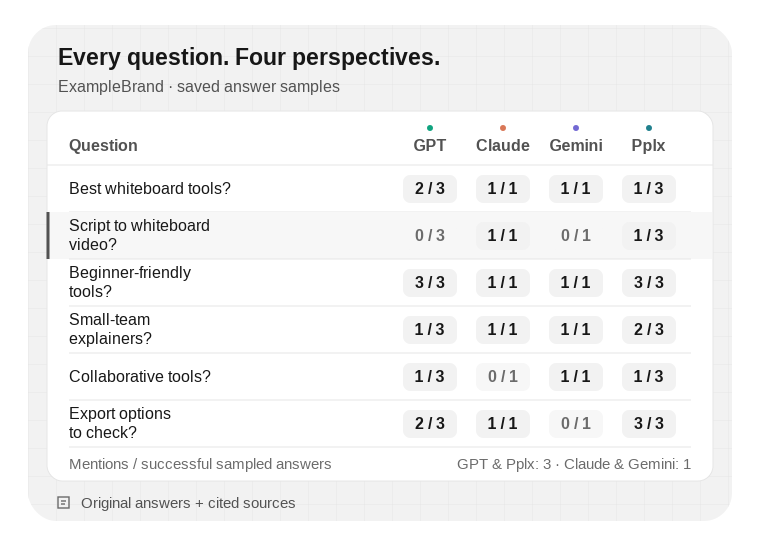
Cómo monitorizar tu marca en ChatGPT

¿Cómo seguir la visibilidad de tu marca en IA a lo largo del tiempo?

Seis preguntas de compradores. Cuatro perspectivas.

PreguntaChatGPTClaudeGeminiPerplexity
Which tools help monitor brand visibility in AI search?2 / 31 / 11 / 11 / 3
How can I track brand mentions in ChatGPT answers?0 / 31 / 10 / 11 / 3
How can a new website check its AI search visibility?3 / 31 / 11 / 13 / 3
How can a small team review sources cited in AI answers?1 / 31 / 11 / 12 / 3
How should a team compare AI visibility monitoring tools?1 / 30 / 11 / 11 / 3
What sampling limits should I check in an AI visibility plan?2 / 31 / 10 / 13 / 3

Menciones / respuestas válidas. El número de muestras varía según la plataforma.

¿Por qué las respuestas de IA podrían omitir tu marca?

Una posición en Google no garantiza una mención en IA. La pregunta, la plataforma, las fuentes y la fecha pueden afectar al resultado. Una ausencia invita a revisar pruebas, pero no diagnostica tu sitio.

SEO y visibilidad en IA miden resultados distintos
Qué comparasSEOVisibilidad en IA / GEO
Dónde aparecesPáginas en resultados de búsquedaMenciones y enlaces a fuentes en respuestas de IA
Qué midesImpresiones, clics y posicionesMenciones y citas en respuestas obtenidas correctamente
Qué aporta contextoConsulta, mercado, dispositivo y fechaPregunta, IA, mercado, idioma, fecha y número de muestras
Qué investigarRelevancia y acceso técnico de la páginaRelevancia de la respuesta, competidores y fuentes citadas

Acceso al sitio, indexación, menciones, recomendaciones y citas son señales distintas. Ni un sitio legible ni un cambio de contenido garantizan recomendaciones de IA.
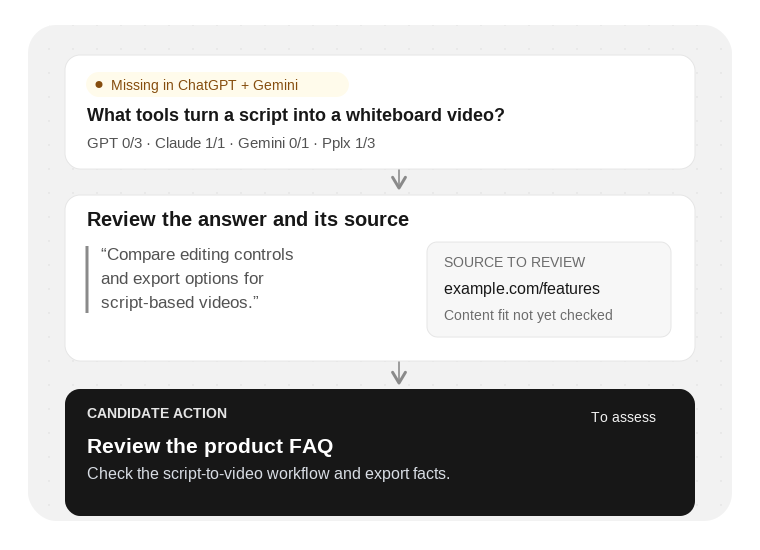
¿Cómo convertir las carencias de las respuestas de IA en contenido?
03DE LA OBSERVACIÓN A LA ACCIÓN

¿Cómo convertir las carencias de las respuestas de IA en contenido?

Revisa las pruebas y elige tu siguiente acción. En planes de pago aptos, crea un borrador desde una oportunidad adecuada de tu sitio, una corrección o un tema propio, y confirma los detalles antes de generarlo.

  • Revisa menciones ausentes y posibles fuentes externas antes de actuar.
  • Revisa y edita borradores basados en respuestas guardadas y hechos confirmados.
  • Copia o exporta Markdown y HTML y publica en tu sitio.

Los contactos de fuentes externas no permiten generar borradores directamente. Comprueba hechos y enlaces: no hay verificación de hechos ni publicación automáticas, y ninguna acción garantiza menciones o citas.

Empieza gratis. Amplía cuando lo necesites.

La prueba anónima consulta 3 preguntas en ChatGPT una vez. Free incluye 9 preguntas de seguimiento; los planes de pago añaden ChatGPT diario, Perplexity semanal y borradores. Growth y Scale añaden un grupo prioritario común para Claude y Gemini. Consulta todas las cuotas en precios.

Ver planes y precios
05BUENAS PREGUNTAS

Dudas sobre tu primera consulta y los siguientes pasos.

Conoce el alcance gratuito, los resultados y la diferencia entre SEO y visibilidad en IA.

Más preguntas y respuestas

¿Cómo compruebo si ChatGPT menciona mi marca?

Introduce tu sitio, revisa tres preguntas sugeridas y confirma la comprobación gratuita. Cada pregunta recibe una respuesta de ChatGPT; lee el original para entender cómo describe tu marca sin interpretar toda mención como recomendación.

¿Qué incluye la comprobación gratuita?

La prueba anónima incluye una comprobación del sitio y tres preguntas en ChatGPT, con una respuesta por pregunta. Puedes leer los primeros resultados sin registrarte. El análisis del sitio evalúa acceso y legibilidad, no demuestra que una IA lo haya indexado.

¿De dónde salen las preguntas sugeridas?

Del contenido del sitio y de la descripción del producto que aportes. Preseleccionamos una pregunta de cada uno de tres grupos de intención; puedes cambiarla por otra del grupo o editarla antes de empezar. Si no se puede leer el sitio, puedes dar una breve descripción.

¿Qué plataformas de IA puedo seguir?

Free sigue 9 preguntas solo en ChatGPT cada 14 días; los planes de pago ejecutan ChatGPT a diario y Perplexity cada semana, con 1 respuesta por pregunta y plataforma en cada consulta. Growth y Scale añaden Claude y Gemini cada 14 días, con 1 respuesta por pregunta del mismo grupo: 25 de las 100 de Growth o 100 de las 250 compartidas de Scale, sin preguntas adicionales ni grupos separados por plataforma. Google AI Overviews no es compatible.

¿Qué diferencia hay entre mención, recomendación y cita?

Una mención nombra tu marca, una recomendación la respalda en contexto y una cita enlaza a una fuente. La tasa de menciones cuenta respuestas obtenidas correctamente que nombran la marca, no recomendaciones confirmadas. Lee el original y considera el número de muestras antes de concluir.

¿Cuál es la diferencia entre SEO y GEO?

SEO se centra en la visibilidad en buscadores; GEO, en cómo aparecen las marcas y fuentes en respuestas generadas por IA. Comparten la necesidad de contenido útil y accesible, pero una posición de búsqueda no demuestra menciones ni citas en IA.

¿Qué pasa cuando inicio sesión y guardo mis resultados?

Inicia sesión para guardar las preguntas y respuestas existentes sin repetir la consulta. Añade 2 preguntas en cada una de las 3 categorías: 6 nuevas más las 3 originales, 9 en total. Iniciar sesión o guardar no ejecuta las 9 preguntas ni activa una programación automáticamente.

¿Mejorar el contenido garantiza menciones o citas?

No. Cambiar el contenido no garantiza menciones, citas ni posiciones en respuestas de IA. Promptvane ayuda a revisar pruebas y, con un plan apto, crear borradores que tú editas y exportas. Compara resultados posteriores en condiciones similares; un cambio en la respuesta no demuestra su causa.

TU PRÓXIMO CLIENTE PUEDE EMPEZAR EN LA IA.

Descubre dónde aparece tu marca.

Revisa tres preguntas. Recibe una respuesta de ChatGPT por pregunta. Primeros resultados sin registro.

Comprobar mi marca gratis

Una respuesta que puedes examinar.

ChatGPT · Which tools help monitor brand visibility in AI search?

A useful shortlist starts with your workflow rather than a single “best” tool.

In this simulated answer, Promptvane appears alongside Tool A and Tool B as an option to investigate for choosing an AI brand visibility monitoring tool. Metrics, answers and sources are simulated for this interface demonstration, not actual platform recommendations or measured results.

Compare the steps you would actually repeat: choosing questions, reviewing sampled answers, comparing mentions, and inspecting cited sources.

Use a short trial project to check the product information against your own needs. The answer can suggest a starting point, but the linked evidence is what you should verify.

EJEMPLO DE FORMATO DE FUENTEhttps://g2.com/https://zapier.com/