跳转到正文

AI 可见度监测与内容优化

看看 ChatGPT 和其他 AI 平台是否提到你的品牌

审核 3 道买家问题。30 秒获取免费报告,查看 ChatGPT 提到了哪些品牌、引用了哪些来源。

免费检测约 30 秒 · 3 道 ChatGPT 问题 · 无需注册

StrokeVideo 样例报告

strokevideo.com · ChatGPT 搜索 ·

美国 · 英语 · 问题和回答保留英语原文。

收到的回答
3 / 3
品牌提及
1 / 3
品牌网站引用
1 / 3
在回答中识别到的产品
  • VideoScribe · 2 / 3 条回答
  • Vyond · 2 / 3 条回答
  • Doodly · 2 / 3 条回答
  • StrokeVideo · 1 / 3 条回答
  • KinoDraw · 1 / 3 条回答
  • Baseink · 1 / 3 条回答
  • Whiteboard Video Maker · 1 / 3 条回答
  • Animaker · 1 / 3 条回答
  • Golpo AI · 1 / 3 条回答
  • Canva · 1 / 3 条回答
问题 1 · 品类推荐Which free AI whiteboard video makers let me export without a watermark?已提及

StrokeVideo — 已提及

品牌网站引用: 是

提到的其他产品 · KinoDraw、Baseink和Whiteboard Video Maker

本条回答中的推荐

StrokeVideo if you want AI to create the entire video from a topic or script.

引用来源 · 7

查看另外 4 个来源
完整原始回答

Yes! There are a few options that let you create whiteboard animation videos for free and download them without a watermark. The catch is that some limit the number of videos, length, or AI credits.

Here are the ones I'd look at first, based on their advertised free features in November 2026.

Best free AI whiteboard video makers

1. StrokeVideo

(Best overall)

  • Free: 1 video per day
  • No watermark on MP4 exports
  • Generates illustrations, script and narration using AI
  • Multiple drawing styles and languages
  • Free videos have a duration limit

Best for: YouTube explainers, educational videos and narrated presentations.

Try StrokeVideo


2. KinoDraw

(Free and open source)

  • Free desktop software
  • No watermark (you can disable its end card)
  • Turns scripts into hand-drawn explainer videos
  • Works offline

Best for: Making whiteboard videos without paying for a subscription.

Download KinoDraw


3. Baseink

(Free no-watermark export)

  • Advertises free no-watermark downloads
  • Whiteboard-style scene editor
  • Landscape, square and portrait formats
  • AI script and voiceover features are associated with Pro

Best for: Building and editing your own whiteboard scenes.

Try Baseink


4. Whiteboard Video Maker

  • Completely free
  • No watermark
  • No account required for basic use
  • Exports WebM video or GIF, rather than MP4

Best for: Simple whiteboard drawings and narrated animations.

View tool and export details

Tools that are free but add watermarks

These are popular, but I wouldn't choose them if watermark-free downloads are essential:

ToolFree export
AnimakerWatermarked
PowtoonWatermarked
VideoScribeTrial restrictions
RenderforestWatermarked
WhiteboardAnimation.aiWatermarked

Sources: www.genpixy.comwhiteboardanimation.aiwhiteboardanimation.ai

My recommendation

I'd start with:

  1. StrokeVideo if you want AI to create the entire video from a topic or script.
  2. KinoDraw if you want a genuinely free desktop solution.
  3. Baseink if you want more control over individual scenes.

One important distinction: watermark-free doesn't necessarily mean unrestricted commercial use. Check each tool's licensing terms before monetizing your videos.

One question so I can narrow it down

What type of whiteboard videos are you trying to create?

1. What kind of creation do you want?

AI creates everything from my script

Animated hand drawing illustrations

Whiteboard with a realistic drawing hand

Cartoon characters and explainer animations


2. Where will you publish the videos?

YouTube (landscape)

YouTube Shorts / TikTok

Online courses / education

Business marketing

[Find my best tools]

问题 2 · 选择条件What are the best AI whiteboard tools for explainer videos?未提及

StrokeVideo — 未提及

品牌网站引用: 否

提到的其他产品 · VideoScribe、Animaker、Golpo AI、Vyond和Doodly

引用来源 · 13

查看另外 10 个来源
完整原始回答

The best AI whiteboard tools for explainer videos depend on whether you want AI to generate the entire video automatically or want to create traditional whiteboard animations where a hand draws illustrations as the narration plays.

For 2026, I'd shortlist VideoScribe, Animaker, Golpo AI, Vyond, and Doodly.

Here are my recommendations, ranked by use case.

Best AI whiteboard video tools

1. VideoScribe

(Best overall for classic whiteboard videos)

  • Traditional hand-drawn animation.
  • AI script generation, AI images and voiceovers.
  • Large library of illustrations and icons.
  • Good control over drawing speed and scene timing.

Best for: Educational videos, tutorials and YouTube explainers.

Website: VideoScribe. www.videoscribe.cowhiteboardanimation.aigeekchamp.com


2. Animaker

(Best all-around AI animation platform)

  • AI-assisted video creation.
  • Whiteboard animation and character animation.
  • Templates, voiceovers and illustrations.
  • More flexibility than traditional whiteboard software.

Best for: Marketing explainers, educational content and business videos.

Website: Animaker. www.itechguides.comwww.itechguides.comeasyimate.com


3. Golpo AI

(Best for automatic AI-generated explainers)

  • Generates videos from prompts or documents.
  • AI-generated scripts and narration.
  • Whiteboard-style drawings.
  • Frame-by-frame editing with prompts.

Best for: Turning articles, educational material and concepts into videos quickly.

Website: Golpo AI. clipflux.aitrychasca.com


4. Vyond

(Best for professional business explainers)

  • AI-assisted script-to-video creation.
  • Professional animated characters.
  • Whiteboard-style animation.
  • Business-oriented templates and branding.

Best for: Corporate training, SaaS explainers and professional presentations.

Website: Vyond. www.itechguides.comeasyimate.com


5. Doodly

(Best for traditional doodle animation)

  • Hand-drawn illustrations.
  • Large collection of characters and props.
  • Control over drawing sequences.
  • Desktop-based editing.

Best for: Simple, engaging whiteboard storytelling.

Website: Doodly. whiteboardanimation.aigeekchamp.com

Quick comparison

ToolAI automationHand-drawing effectBest use
VideoScribePartialYesClassic explainers
AnimakerHighWhiteboard styleVersatile videos
Golpo AIHighYesAutomated explainers
VyondHighWhiteboard styleBusiness videos
DoodlyLowYesDoodle storytelling

One important distinction: AI-generated whiteboard illustrations aren't necessarily the same as the traditional animation effect where a hand physically draws each illustration on screen.

My recommendation

I'd narrow it down to three:

  • VideoScribe: If you want the authentic whiteboard drawing experience.
  • Golpo AI: If you want to enter a topic or upload a document and have AI create most of the explainer.
  • Animaker: If you want a combination of AI, whiteboard animation and more conventional animated videos.

Let me narrow it down to the best tool for your project

What kind of explainer videos are you planning to create?

1. How do you want to create the videos?

AI creates the entire video from a prompt or script

I create scenes, with AI helping

I want complete manual control


2. What are the videos for?

Educational / YouTube videos

Business / Marketing explainers

Online courses and tutorials

Social media / Short videos


3. Monthly budget?

Free

Under $20/month

$20–$50/month

$50–$100/month

More than $100/month


4. What visual style do you prefer?

Traditional whiteboard with a hand drawing illustrations

Modern AI-generated illustrations and diagrams

Cartoon characters and storytelling

A combination of all three

[Find my best tools]

问题 3 · 使用场景How can I make a whiteboard explainer video from a written script?未提及

StrokeVideo — 未提及

品牌网站引用: 否

提到的其他产品 · VideoScribe、Doodly、Vyond和Canva

引用来源 · 6

查看另外 3 个来源
完整原始回答

You can turn a written script into a whiteboard explainer video by converting the script into a visual storyboard, adding hand-drawn illustrations, recording a voiceover, and synchronizing the drawings with the narration.

You don't need animation or video-editing experience. There are tools that can automate much of the process.

1. The process: From script to finished video

Step 1. Break your script into scenes

Divide the script into short sections. Each section should communicate one main idea.


Step 2. Create illustrations

Choose simple drawings, icons, arrows, characters, diagrams, and keywords that represent each section.


Step 3. Animate the drawings

Use software to simulate a hand drawing illustrations onto a whiteboard.


Step 4. Add narration

Record your voice or use an AI-generated voice to read your script.


Step 5. Synchronize and export

Match the drawings to the narration, add background music if appropriate, and export your video.

2. Software you can use

Here are some popular options:

VideoScribe

Excellent for traditional whiteboard animations with a hand drawing effect. Good for turning scripts into illustrated scenes.

Visit VideoScribe


Doodly

Designed for drag-and-drop doodle animations. Useful if you don't want to draw illustrations yourself.

Visit Doodly


Vyond

Better for character-driven animated explainers, business presentations, and storytelling.

Visit Vyond


Canva

Beginner-friendly for combining illustrations, text, narration, and simple animations. Less focused on authentic hand-drawing effects.

Visit Canva

3. Example: Converting a script into a storyboard

Suppose your script says:

"Every successful business starts with a problem that needs solving. The challenge is finding the right solution and delivering value to customers."

You could visualize it like this:

Scene 1: The problem

Draw a person with a question mark above their head.

Scene 2: The solution

Draw a light bulb appearing with rays of light.

Scene 3: Delivering value

Draw two people shaking hands.

Scene 4: Success

Draw an upward graph showing business growth.

The narration continues while each illustration is drawn onto the screen.

4. My recommended workflow

For a straightforward project, I'd recommend:

  1. Start with your written script.
  2. Use ChatGPT to break it into scenes and suggest illustrations.
  3. Use VideoScribe to assemble and animate the scenes.
  4. Generate or record the narration.
  5. Synchronize everything and export as an MP4.

VideoScribe documents this entire workflow, including AI voiceovers, scene timing, and HD export. www.videoscribe.cowww.videoscribe.co

5. I can help you turn your actual script into a video plan

If you already have a written script, you can paste it here.

I can help transform it into:

  • Scene-by-scene storyboard: What appears on screen for every part of the narration.
  • Illustration instructions: Exactly what should be drawn.
  • Animation directions: When drawings appear, move, or disappear.
  • Voiceover timing: How to synchronize narration with the visuals.
  • Production instructions: How to assemble the finished video in your chosen software.

One question: What kind of whiteboard explainer are you looking to create?

1. Preferred visual style

Traditional whiteboard with drawing hand

Modern colorful whiteboard animation

Professional business explainer


2. Approximate video length

1–2 minutes

3–5 minutes

5–10 minutes

10+ minutes


3. Narration

AI-generated voice

My own recorded voice

No narration

[Continue]

You can also paste your script directly, and we can start turning it into a storyboard.

网站检测详情

网站正文可读取

我们读取的 strokevideo.com 页面

什么是 Promptvane?

Promptvane 是面向 ChatGPT、Claude、Gemini 和 Perplexity 的 AI 可见度监测与内容优化平台。监测品牌提及、比较竞品、检查引用来源,并将适用机会转化为内容草稿。先从免费网站检查和三道 ChatGPT 问题开始;Free 账号可持续监测 ChatGPT,升级后可使用更多平台、更高额度和内容草稿。

免费 ChatGPT 可见度检查怎么进行?

先审核问题,再请求回答。从你的网站开始,无需面对空白提示框。

  1. 输入你的网站

    我们读取网站,提出相关的买家问题。需要补充信息时,你可以提供简短的产品描述。

  2. 审核三道问题

    确认品牌、目标市场和语言。在确认检查前,可替换建议问题或编辑这三题。

  3. 查看 ChatGPT 回答

    每题获取一条回答。无需登录即可查看品牌提及、阅读原文,并检查可用来源。

三道问题,每题一答。登录可保存结果,单独保存不会再次检查。

四个平台,各自独立的回答。
Promptvane · 产品演示 · 6 个问题美国 · 英语
9/18品牌提及
2示例来源

Which tools help monitor brand visibility in AI search?

A useful shortlist starts with your workflow rather than a single “best” tool.

In this simulated answer, Promptvane appears alongside Tool A and Tool B as an option to investigate for choosing an AI brand visibility monitoring tool. Metrics, answers and sources are simulated for this interface demonstration, not actual platform recommendations or measured results.

Compare the steps you would actually repeat: choosing questions, reviewing sampled answers, comparing mentions, and inspecting cited sources.

Use a short trial project to check the product information against your own needs. The answer can suggest a starting point, but the linked evidence is what you should verify.

示例来源g2.comzapier.com
1 / 6

在四个 AI 平台上追踪你的品牌。

ChatGPTClaudeGeminiPerplexity

Free 包含 ChatGPT,Starter 增加 Perplexity;付费套餐 ChatGPT 每天、Perplexity 每周,每次各平台每题 1 答。Growth 和 Scale 增加 Claude 与 Gemini,共用一组重点题,并非覆盖全部问题。

01看见完整回答

一条 AI 回答能告诉你什么?

看看品牌是否出现、哪些竞品被提到,以及回答究竟说了什么。阅读原文与引用链接:提及不一定是推荐,引用则是指向来源的链接。

一个客户可能会问的问题

Which tools help monitor brand visibility in AI search?

切换上方平台和问题,查看同一选型场景下各自的回答示例。

美国 · 英语

In this simulated answer, Promptvane appears alongside Tool A and Tool B as an option to investigate for choosing an AI brand visibility monitoring tool. Metrics, answers and sources are simulated for this interface demonstration, not actual platform recommendations or measured results.

当前问题
2/ 3

条采样回答提到了品牌

保留原始回答查看引用来源明确样本数量保留市场与语言条件
02监测真正重要的问题

如何持续追踪品牌的 AI 可见度?

保存对业务重要的问题,配置监测并按时间对比回答。Free:1 个网站、9 道监测问题。ChatGPT 每 14 天每题 1 答,不含其他引擎或内容草稿。

  • 选择问题、目标市场和语言。
  • 检查品牌提及、竞品和引用来源。
  • 对比批次时,同时核对平台与成功样本数。

如何在 ChatGPT 中监测你的品牌

如何持续追踪品牌的 AI 可见度?

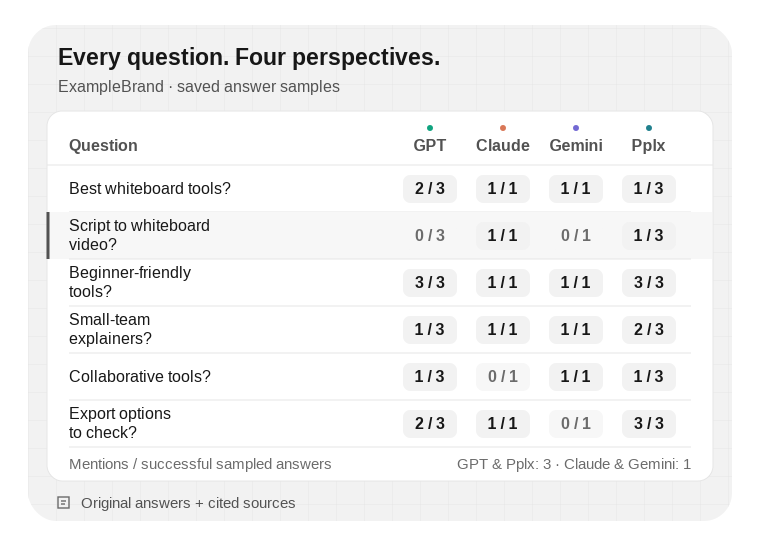
六个买家问题,四个平台的不同表现。

监测问题ChatGPTClaudeGeminiPerplexity
Which tools help monitor brand visibility in AI search?2 / 31 / 11 / 11 / 3
How can I track brand mentions in ChatGPT answers?0 / 31 / 10 / 11 / 3
How can a new website check its AI search visibility?3 / 31 / 11 / 13 / 3
How can a small team review sources cited in AI answers?1 / 31 / 11 / 12 / 3
How should a team compare AI visibility monitoring tools?1 / 30 / 11 / 11 / 3
What sampling limits should I check in an AI visibility plan?2 / 31 / 10 / 13 / 3

品牌提及数/有效回答数,各平台样本数不同。

为什么 AI 回答可能没有提到你的品牌?

Google 排名不保证 AI 回答会提到你。问题、平台、可用来源和检查时间都会影响结果。一次未提及值得查看证据,但不能据此诊断网站问题。

SEO 与 AI 可见度衡量不同结果
对比内容SEOAI 可见度 / GEO
出现位置搜索结果中的网页AI 回答中的品牌提及和来源链接
衡量指标搜索曝光、点击和排名成功采样回答中的提及与引用
对照条件搜索词、市场、设备和时间问题、AI 平台、市场、语言、时间和样本数
调查方向网页相关性与技术访问回答相关性、被提及的竞品及实际引用来源

网站访问、搜索收录、品牌提及、推荐和引用是不同信号。网站可读或修改内容,都不能保证 AI 推荐。
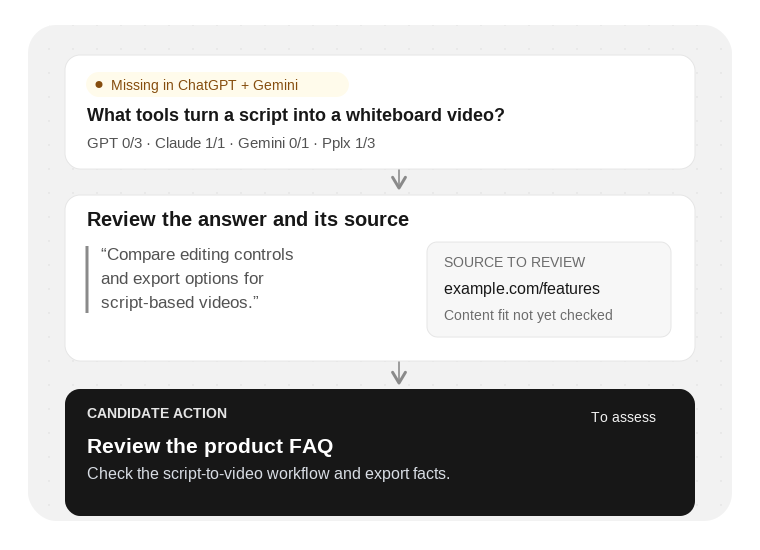
如何把 AI 回答中的缺口转化为内容?
03从观察,走向下一步

如何把 AI 回答中的缺口转化为内容?

先检查证据,再选择下一步。适用的付费套餐可从合适的自站或纠错机会、或自己的主题开始起草,并在生成前确认信息。

  • 先检查缺失的提及与第三方来源线索,再决定行动。
  • 根据已保存回答与确认的事实,审核和编辑草稿。
  • 复制或导出 Markdown 与 HTML,自行在网站发布。

第三方来源外联线索不提供直接起草操作。请自行核对事实与链接:草稿不会自动核查事实或发布,任何行动都不保证 AI 提及或引用。

免费开始,按需扩展。

匿名体验单次检查 3 道 ChatGPT 问题。Free 账号包含 9 道监测问题;付费套餐增加每日 ChatGPT、每周 Perplexity 和内容草稿。Growth 与 Scale 为 Claude 和 Gemini 提供共用重点题组,完整额度见定价页。

查看套餐与价格
05你可能还想知道

首次检查与后续使用,你可能想知道。

了解免费范围、结果,以及 SEO 和 AI 可见度的区别。

查看其他常见问题

如何检查 ChatGPT 是否提到我的品牌?

输入网站,审核三道建议问题,再确认免费检查。每题获取一条 ChatGPT 回答;阅读原文了解品牌如何被描述,不能把每次提及都当成推荐。

免费检查包含什么?

匿名体验包含网站检查和三道 ChatGPT 问题,每题一答。无需注册即可阅读首次结果。网站检查评估访问与可读性,不能证明 AI 已收录你的网站。

建议问题从哪里来?

来自网站内容及你提供的产品描述。我们从三个意图类别各预选一题;开始前可在同类别替换备选题或编辑问题。若无法读取网站,可补充简短描述。

可以监测哪些 AI 平台?

Free 仅在 ChatGPT 每 14 天监测 9 题;付费套餐的 ChatGPT 每天、Perplexity 每周运行,各平台每次每题 1 答。Growth 和 Scale 增加 Claude 与 Gemini,每 14 天各为同一组重点题每题返回 1 答:Growth 从 100 题中选 25 题,Scale 从共享的 250 题中选 100 题,不额外计题,也不按平台分组选题。不支持 Google AI Overviews。

提及、推荐和引用有什么区别?

提及是说出品牌名,推荐是在语境中认可品牌,引用则是链接到来源网页。提及率统计成功采样回答中出现品牌的比例,不是已确认的推荐率。作判断前请阅读原文,并核对样本数。

SEO 和 GEO 有什么区别?

SEO 关注搜索结果中的可见度;GEO 关注品牌与来源如何出现在 AI 生成的回答中。两者都需要有用、可访问的内容,但搜索排名不能证明 AI 会提及或引用你。

登录并保存结果后会发生什么?

登录可保存现有问题与回答,不会重新查询。三个类别各新增 2 题,共新增 6 题,加上原有 3 题合计 9 题。登录或保存不会自动运行这 9 题,也不会启用定时监测。

优化内容能保证 AI 提及或引用吗?

不能,修改内容不保证 AI 回答中的提及、引用或排名。Promptvane 帮助你审阅证据;适用套餐还可创建草稿,由你编辑、导出。请在类似条件下比较后续结果,回答变化不证明具体成因。

你的下一位客户,也可能从 AI 开始。

看看你的品牌,出现在什么位置。

审核三道问题,每题获取一条 ChatGPT 回答。首次结果无需注册。

免费检查我的品牌

每个结果,都有可以查看的细节。

ChatGPT · Which tools help monitor brand visibility in AI search?

A useful shortlist starts with your workflow rather than a single “best” tool.

In this simulated answer, Promptvane appears alongside Tool A and Tool B as an option to investigate for choosing an AI brand visibility monitoring tool. Metrics, answers and sources are simulated for this interface demonstration, not actual platform recommendations or measured results.

Compare the steps you would actually repeat: choosing questions, reviewing sampled answers, comparing mentions, and inspecting cited sources.

Use a short trial project to check the product information against your own needs. The answer can suggest a starting point, but the linked evidence is what you should verify.

来源格式示例https://g2.com/https://zapier.com/