本文へ移動

AI可視性のモニタリングとコンテンツ改善

ChatGPTや他のAIがあなたのブランドに言及しているか確認

購入を検討する人が聞く3つの質問をチェック。30秒で、ChatGPT が言及したブランドと引用元がわかる無料レポートを取得できます。

無料で約30秒 · ChatGPTに3問 · 登録不要

StrokeVideo のサンプルレポート

strokevideo.com · ChatGPT 検索 ·

アメリカ合衆国 · 英語 · 質問と回答は英語の原文です。

取得した回答
3 / 3
ブランドへの言及
1 / 3
ブランドサイトの引用
1 / 3
回答から特定した製品
  • VideoScribe · 2 / 3 件の回答
  • Vyond · 2 / 3 件の回答
  • Doodly · 2 / 3 件の回答
  • StrokeVideo · 1 / 3 件の回答
  • KinoDraw · 1 / 3 件の回答
  • Baseink · 1 / 3 件の回答
  • Whiteboard Video Maker · 1 / 3 件の回答
  • Animaker · 1 / 3 件の回答
  • Golpo AI · 1 / 3 件の回答
  • Canva · 1 / 3 件の回答
質問 1 · カテゴリ推薦Which free AI whiteboard video makers let me export without a watermark?言及あり

StrokeVideo — 言及あり

ブランドサイトの引用: はい

ほかに登場した製品 · KinoDraw、Baseink、Whiteboard Video Maker

この回答でのおすすめ

StrokeVideo if you want AI to create the entire video from a topic or script.

引用元 · 7 件

ほか 4 件の出典を見る
回答全文

Yes! There are a few options that let you create whiteboard animation videos for free and download them without a watermark. The catch is that some limit the number of videos, length, or AI credits.

Here are the ones I'd look at first, based on their advertised free features in November 2026.

Best free AI whiteboard video makers

1. StrokeVideo

(Best overall)

  • Free: 1 video per day
  • No watermark on MP4 exports
  • Generates illustrations, script and narration using AI
  • Multiple drawing styles and languages
  • Free videos have a duration limit

Best for: YouTube explainers, educational videos and narrated presentations.

Try StrokeVideo


2. KinoDraw

(Free and open source)

  • Free desktop software
  • No watermark (you can disable its end card)
  • Turns scripts into hand-drawn explainer videos
  • Works offline

Best for: Making whiteboard videos without paying for a subscription.

Download KinoDraw


3. Baseink

(Free no-watermark export)

  • Advertises free no-watermark downloads
  • Whiteboard-style scene editor
  • Landscape, square and portrait formats
  • AI script and voiceover features are associated with Pro

Best for: Building and editing your own whiteboard scenes.

Try Baseink


4. Whiteboard Video Maker

  • Completely free
  • No watermark
  • No account required for basic use
  • Exports WebM video or GIF, rather than MP4

Best for: Simple whiteboard drawings and narrated animations.

View tool and export details

Tools that are free but add watermarks

These are popular, but I wouldn't choose them if watermark-free downloads are essential:

ToolFree export
AnimakerWatermarked
PowtoonWatermarked
VideoScribeTrial restrictions
RenderforestWatermarked
WhiteboardAnimation.aiWatermarked

Sources: www.genpixy.comwhiteboardanimation.aiwhiteboardanimation.ai

My recommendation

I'd start with:

  1. StrokeVideo if you want AI to create the entire video from a topic or script.
  2. KinoDraw if you want a genuinely free desktop solution.
  3. Baseink if you want more control over individual scenes.

One important distinction: watermark-free doesn't necessarily mean unrestricted commercial use. Check each tool's licensing terms before monetizing your videos.

One question so I can narrow it down

What type of whiteboard videos are you trying to create?

1. What kind of creation do you want?

AI creates everything from my script

Animated hand drawing illustrations

Whiteboard with a realistic drawing hand

Cartoon characters and explainer animations


2. Where will you publish the videos?

YouTube (landscape)

YouTube Shorts / TikTok

Online courses / education

Business marketing

[Find my best tools]

質問 2 · 選択条件What are the best AI whiteboard tools for explainer videos?言及なし

StrokeVideo — 言及なし

ブランドサイトの引用: いいえ

ほかに登場した製品 · VideoScribe、Animaker、Golpo AI、Vyond、Doodly

引用元 · 13 件

ほか 10 件の出典を見る
回答全文

The best AI whiteboard tools for explainer videos depend on whether you want AI to generate the entire video automatically or want to create traditional whiteboard animations where a hand draws illustrations as the narration plays.

For 2026, I'd shortlist VideoScribe, Animaker, Golpo AI, Vyond, and Doodly.

Here are my recommendations, ranked by use case.

Best AI whiteboard video tools

1. VideoScribe

(Best overall for classic whiteboard videos)

  • Traditional hand-drawn animation.
  • AI script generation, AI images and voiceovers.
  • Large library of illustrations and icons.
  • Good control over drawing speed and scene timing.

Best for: Educational videos, tutorials and YouTube explainers.

Website: VideoScribe. www.videoscribe.cowhiteboardanimation.aigeekchamp.com


2. Animaker

(Best all-around AI animation platform)

  • AI-assisted video creation.
  • Whiteboard animation and character animation.
  • Templates, voiceovers and illustrations.
  • More flexibility than traditional whiteboard software.

Best for: Marketing explainers, educational content and business videos.

Website: Animaker. www.itechguides.comwww.itechguides.comeasyimate.com


3. Golpo AI

(Best for automatic AI-generated explainers)

  • Generates videos from prompts or documents.
  • AI-generated scripts and narration.
  • Whiteboard-style drawings.
  • Frame-by-frame editing with prompts.

Best for: Turning articles, educational material and concepts into videos quickly.

Website: Golpo AI. clipflux.aitrychasca.com


4. Vyond

(Best for professional business explainers)

  • AI-assisted script-to-video creation.
  • Professional animated characters.
  • Whiteboard-style animation.
  • Business-oriented templates and branding.

Best for: Corporate training, SaaS explainers and professional presentations.

Website: Vyond. www.itechguides.comeasyimate.com


5. Doodly

(Best for traditional doodle animation)

  • Hand-drawn illustrations.
  • Large collection of characters and props.
  • Control over drawing sequences.
  • Desktop-based editing.

Best for: Simple, engaging whiteboard storytelling.

Website: Doodly. whiteboardanimation.aigeekchamp.com

Quick comparison

ToolAI automationHand-drawing effectBest use
VideoScribePartialYesClassic explainers
AnimakerHighWhiteboard styleVersatile videos
Golpo AIHighYesAutomated explainers
VyondHighWhiteboard styleBusiness videos
DoodlyLowYesDoodle storytelling

One important distinction: AI-generated whiteboard illustrations aren't necessarily the same as the traditional animation effect where a hand physically draws each illustration on screen.

My recommendation

I'd narrow it down to three:

  • VideoScribe: If you want the authentic whiteboard drawing experience.
  • Golpo AI: If you want to enter a topic or upload a document and have AI create most of the explainer.
  • Animaker: If you want a combination of AI, whiteboard animation and more conventional animated videos.

Let me narrow it down to the best tool for your project

What kind of explainer videos are you planning to create?

1. How do you want to create the videos?

AI creates the entire video from a prompt or script

I create scenes, with AI helping

I want complete manual control


2. What are the videos for?

Educational / YouTube videos

Business / Marketing explainers

Online courses and tutorials

Social media / Short videos


3. Monthly budget?

Free

Under $20/month

$20–$50/month

$50–$100/month

More than $100/month


4. What visual style do you prefer?

Traditional whiteboard with a hand drawing illustrations

Modern AI-generated illustrations and diagrams

Cartoon characters and storytelling

A combination of all three

[Find my best tools]

質問 3 · 利用場面How can I make a whiteboard explainer video from a written script?言及なし

StrokeVideo — 言及なし

ブランドサイトの引用: いいえ

ほかに登場した製品 · VideoScribe、Doodly、Vyond、Canva

引用元 · 6 件

ほか 3 件の出典を見る
回答全文

You can turn a written script into a whiteboard explainer video by converting the script into a visual storyboard, adding hand-drawn illustrations, recording a voiceover, and synchronizing the drawings with the narration.

You don't need animation or video-editing experience. There are tools that can automate much of the process.

1. The process: From script to finished video

Step 1. Break your script into scenes

Divide the script into short sections. Each section should communicate one main idea.


Step 2. Create illustrations

Choose simple drawings, icons, arrows, characters, diagrams, and keywords that represent each section.


Step 3. Animate the drawings

Use software to simulate a hand drawing illustrations onto a whiteboard.


Step 4. Add narration

Record your voice or use an AI-generated voice to read your script.


Step 5. Synchronize and export

Match the drawings to the narration, add background music if appropriate, and export your video.

2. Software you can use

Here are some popular options:

VideoScribe

Excellent for traditional whiteboard animations with a hand drawing effect. Good for turning scripts into illustrated scenes.

Visit VideoScribe


Doodly

Designed for drag-and-drop doodle animations. Useful if you don't want to draw illustrations yourself.

Visit Doodly


Vyond

Better for character-driven animated explainers, business presentations, and storytelling.

Visit Vyond


Canva

Beginner-friendly for combining illustrations, text, narration, and simple animations. Less focused on authentic hand-drawing effects.

Visit Canva

3. Example: Converting a script into a storyboard

Suppose your script says:

"Every successful business starts with a problem that needs solving. The challenge is finding the right solution and delivering value to customers."

You could visualize it like this:

Scene 1: The problem

Draw a person with a question mark above their head.

Scene 2: The solution

Draw a light bulb appearing with rays of light.

Scene 3: Delivering value

Draw two people shaking hands.

Scene 4: Success

Draw an upward graph showing business growth.

The narration continues while each illustration is drawn onto the screen.

4. My recommended workflow

For a straightforward project, I'd recommend:

  1. Start with your written script.
  2. Use ChatGPT to break it into scenes and suggest illustrations.
  3. Use VideoScribe to assemble and animate the scenes.
  4. Generate or record the narration.
  5. Synchronize everything and export as an MP4.

VideoScribe documents this entire workflow, including AI voiceovers, scene timing, and HD export. www.videoscribe.cowww.videoscribe.co

5. I can help you turn your actual script into a video plan

If you already have a written script, you can paste it here.

I can help transform it into:

  • Scene-by-scene storyboard: What appears on screen for every part of the narration.
  • Illustration instructions: Exactly what should be drawn.
  • Animation directions: When drawings appear, move, or disappear.
  • Voiceover timing: How to synchronize narration with the visuals.
  • Production instructions: How to assemble the finished video in your chosen software.

One question: What kind of whiteboard explainer are you looking to create?

1. Preferred visual style

Traditional whiteboard with drawing hand

Modern colorful whiteboard animation

Professional business explainer


2. Approximate video length

1–2 minutes

3–5 minutes

5–10 minutes

10+ minutes


3. Narration

AI-generated voice

My own recorded voice

No narration

[Continue]

You can also paste your script directly, and we can start turning it into a storyboard.

サイト確認の詳細

サイト本文を読み取れました

strokevideo.com で読み取ったページ

Promptvaneとは?

PromptvaneはChatGPT、Claude、Gemini、Perplexity向けのAI可視性モニタリングとコンテンツ改善のプラットフォームです。ブランドへの言及、競合、引用元を確認し、対象となる機会から下書きを作れます。まずは無料のサイトチェックとChatGPTの3問から。FreeでChatGPTを継続観測し、アップグレードで対象プラットフォーム、利用枠、下書きを増やせます。

無料ChatGPT可視性チェックの流れは?

回答を取得する前に質問を確認できます。空白の入力欄ではなく、あなたのサイトから始めましょう。

  1. サイトを入力

    サイトを読み取り、購入検討者に関連する質問を提案します。必要に応じて短い製品説明を追加できます。

  2. 3つの質問を確認

    ブランド、対象市場、言語を確認します。チェックを確定する前に候補を入れ替えたり、3問を編集したりできます。

  3. ChatGPTの回答を確認

    各質問につき1回答。ログインせずにブランドへの言及、原文、利用可能な出典を確認できます。

3問、各質問1回答。ログインして保存できますが、保存だけでは再実行しません。

4つのプラットフォーム、それぞれの回答。
Promptvane · 製品デモ · 質問6件米国 · 英語
9/18ブランドへの言及
2引用元の例

Which tools help monitor brand visibility in AI search?

A useful shortlist starts with your workflow rather than a single “best” tool.

In this simulated answer, Promptvane appears alongside Tool A and Tool B as an option to investigate for choosing an AI brand visibility monitoring tool. Metrics, answers and sources are simulated for this interface demonstration, not actual platform recommendations or measured results.

Compare the steps you would actually repeat: choosing questions, reviewing sampled answers, comparing mentions, and inspecting cited sources.

Use a short trial project to check the product information against your own needs. The answer can suggest a starting point, but the linked evidence is what you should verify.

引用元g2.comzapier.com
1 / 6

4つのAIプラットフォームでブランドを追跡。

ChatGPTClaudeGeminiPerplexity

FreeはChatGPT、StarterはPerplexityも利用できます。有料プランはChatGPTが毎日、Perplexityが毎週で、各質問1回答です。GrowthとScaleではClaudeとGeminiも利用できますが、全質問ではなく共通の重点質問群が対象です。

01回答の全体像を確認

AIの回答から何が分かる?

ブランドの登場、言及された競合、実際の説明を確認しましょう。原文と引用リンクを読みます。言及は必ずしも推薦ではなく、引用は出典へのリンクです。

顧客が尋ねる質問の例

Which tools help monitor brand visibility in AI search?

上のプラットフォームタブと質問の切り替えで、同じ購入検討場面の回答例を比較できます。

米国 · 英語

In this simulated answer, Promptvane appears alongside Tool A and Tool B as an option to investigate for choosing an AI brand visibility monitoring tool. Metrics, answers and sources are simulated for this interface demonstration, not actual platform recommendations or measured results.

この質問
2/ 3

件のサンプル回答がブランドに言及

回答原文引用元明確なサンプル数市場と言語の条件
02重要な質問を監視

ブランドのAI可視性を継続して追うには?

事業に重要な質問を保存し、モニタリングを設定して時系列で回答を比較します。Freeは1サイト、モニタリング9問。ChatGPTで14日ごとに各質問1回答を取得し、他のエンジンや下書きは含みません。

  • 質問、対象市場、言語を選択。
  • ブランドへの言及、競合、引用元を確認。
  • プラットフォームと成功サンプル数を確認しながら実行結果を比較。

ChatGPTでブランドをモニタリングする方法

ブランドのAI可視性を継続して追うには?

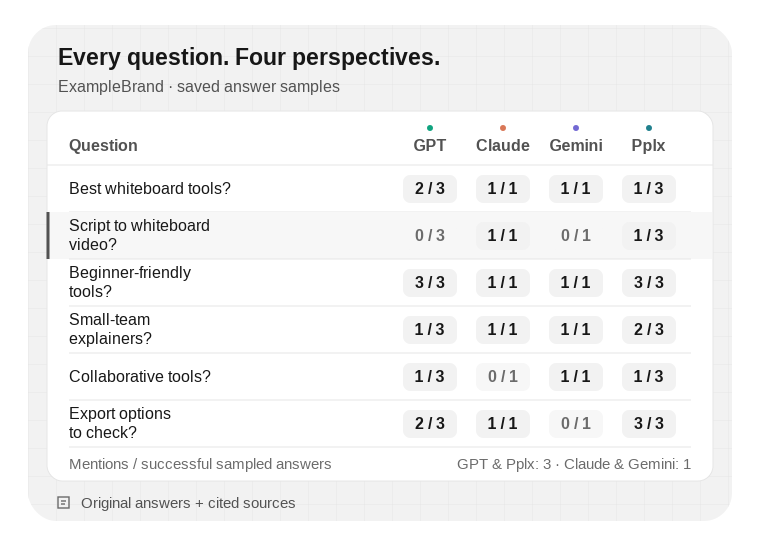
6つの購入検討の質問。4つの視点。

質問ChatGPTClaudeGeminiPerplexity
Which tools help monitor brand visibility in AI search?2 / 31 / 11 / 11 / 3
How can I track brand mentions in ChatGPT answers?0 / 31 / 10 / 11 / 3
How can a new website check its AI search visibility?3 / 31 / 11 / 13 / 3
How can a small team review sources cited in AI answers?1 / 31 / 11 / 12 / 3
How should a team compare AI visibility monitoring tools?1 / 30 / 11 / 11 / 3
What sampling limits should I check in an AI visibility plan?2 / 31 / 10 / 13 / 3

言及数/有効回答数。サンプル数はプラットフォームごとに異なります。

AIの回答にブランドが出ないのはなぜ?

Googleでの順位はAIでの言及を保証しません。質問、プラットフォーム、利用できる出典、時点によって結果は変わります。1回の言及不足は証拠を調べるきっかけであり、サイトの診断結果ではありません。

SEOとAI可視性は異なる成果を測る
比較対象SEOAI可視性 / GEO
表示場所検索結果に表示されるページAI回答内のブランドへの言及と出典リンク
測定するもの検索表示回数、クリック、順位取得に成功したサンプル回答内の言及と引用
比較条件検索語、市場、端末、時点質問、AI、市場、言語、時点、サンプル数
調べる対象ページの関連性と技術的アクセス回答の関連性、競合名、実際の引用元

サイトへのアクセス、検索への収録、ブランドへの言及、推薦、引用は別の信号です。読み取れるサイトや内容変更がAIの推薦を保証するわけではありません。
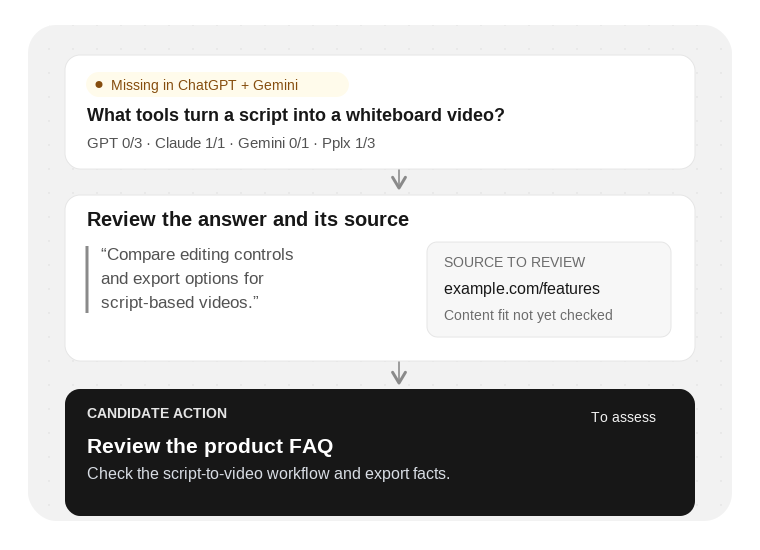
AI回答の不足をコンテンツに変えるには?
03観察から次の行動へ

AI回答の不足をコンテンツに変えるには?

証拠を確認して次の行動を選びます。対象の有料プランでは、自社サイトや訂正に関する適切な機会、または自分のテーマから下書きを開始し、生成前に詳細を確認できます。

  • 言及の不足や外部出典の候補を調べてから行動を決める。
  • 保存した回答と確認済みの事実を基に下書きを確認・編集。
  • MarkdownやHTMLをコピー・書き出しし、自社サイトで公開。

外部出典への連絡候補から直接下書きは作成できません。事実とリンクは自分で確認してください。事実確認と公開は自動ではなく、AIの言及や引用を保証しません。

無料で始めて、必要に応じて拡張。

匿名チェックはChatGPTの3問を1回実行。Freeはモニタリング9問、有料プランは毎日のChatGPT、毎週のPerplexity、下書きを追加します。GrowthとScaleではClaudeとGeminiの共通重点質問群も利用できます。詳細は料金ページへ。

プランと料金を見る
05よくあるご質問

最初のチェックと、その後について。

無料の範囲、結果の読み方、SEOとAI可視性の違いを確認。

その他の質問と回答

ChatGPTがブランドに言及しているか確認するには?

サイトを入力し、提案された3問を確認して無料チェックを確定します。各質問につきChatGPTの1回答を取得します。言及をすべて推薦と考えず、原文でどのように説明されているか確認してください。

無料チェックには何が含まれる?

匿名チェックはサイトの確認とChatGPTの3問で、各質問1回答です。最初の結果は登録せずに読めます。サイトチェックはアクセスと読み取りやすさを確認するもので、AIへの収録を証明しません。

質問の候補はどこから作られる?

サイトの内容と入力した製品説明に基づきます。3つの意図グループから1問ずつ選びますが、開始前に同じグループの候補への変更や編集ができます。サイトを読み取れない場合は短い説明を入力できます。

どのAIプラットフォームをモニタリングできる?

FreeはChatGPTのみで9問を14日ごとに確認し、有料プランはChatGPTを毎日、Perplexityを毎週、各質問1回答で実行します。GrowthとScaleではClaudeとGeminiも14日ごとに同じ重点質問群を使い、各質問1回答を取得します。Growthは100問中25問、Scaleは全サイト共通の250問中100問で、追加枠やプラットフォーム別の質問群ではなく、Google AI Overviewsは対象外です。

言及・推薦・引用の違いは?

言及はブランド名を挙げること、推薦は文脈の中で勧めること、引用は出典ページへのリンクです。言及率は取得に成功したサンプル回答で名前が出た割合で、推薦を確認した割合ではありません。原文とサンプル数を確認して判断してください。

SEOとGEOの違いは?

SEOは検索結果の可視性、GEOはAIが生成する回答にブランドや出典がどう登場するかに注目します。有用でアクセス可能な内容という共通点はありますが、検索順位でAIの言及や引用の有無は分かりません。

ログインして保存するとどうなる?

ログインすると既存の質問と回答を再実行せずに保存できます。3カテゴリそれぞれに2問ずつ、計6問を追加すると、元の3問と合わせて9問になります。ログインや保存だけでは9問の実行も定期モニタリングの有効化も行いません。

コンテンツ改善でAIの言及や引用を保証できる?

いいえ。内容を変えてもAI回答の言及・引用・順位は保証できません。Promptvaneは証拠の確認を支援し、対象プランでは自分で編集・書き出しする下書きも作成できます。同様の条件で後の結果を比べても、回答の変化だけでは原因を証明できません。

次の顧客は AI 検索から来るかもしれません。

ブランドの現在地を確認しましょう。

3問を確認し、各質問につきChatGPTの1回答を取得。最初の結果に登録は不要です。

ブランドを無料チェック

回答の詳しい内容を確認できます。

ChatGPT · Which tools help monitor brand visibility in AI search?

A useful shortlist starts with your workflow rather than a single “best” tool.

In this simulated answer, Promptvane appears alongside Tool A and Tool B as an option to investigate for choosing an AI brand visibility monitoring tool. Metrics, answers and sources are simulated for this interface demonstration, not actual platform recommendations or measured results.

Compare the steps you would actually repeat: choosing questions, reviewing sampled answers, comparing mentions, and inspecting cited sources.

Use a short trial project to check the product information against your own needs. The answer can suggest a starting point, but the linked evidence is what you should verify.

引用元の形式例https://g2.com/https://zapier.com/