Aller au contenu

Suivi de visibilité dans l’IA et optimisation de contenu

Vérifiez si ChatGPT et les autres IA mentionnent votre marque

Examinez 3 questions d’acheteurs. En 30 secondes, un rapport gratuit vous indique les marques que ChatGPT mentionne et les sources qu’il cite.

Vérification gratuite en 30 s · 3 questions à ChatGPT · Sans inscription

Rapport d’exemple pour StrokeVideo

strokevideo.com · Recherche ChatGPT ·

États-Unis · anglais · Les questions et les réponses sont dans leur version originale en anglais.

Réponses reçues
3 / 3
Marque mentionnée
1 / 3
Site de la marque cité
1 / 3
Produits identifiés dans les réponses
  • VideoScribe · 2 / 3 réponses
  • Vyond · 2 / 3 réponses
  • Doodly · 2 / 3 réponses
  • StrokeVideo · 1 / 3 réponses
  • KinoDraw · 1 / 3 réponses
  • Baseink · 1 / 3 réponses
  • Whiteboard Video Maker · 1 / 3 réponses
  • Animaker · 1 / 3 réponses
  • Golpo AI · 1 / 3 réponses
  • Canva · 1 / 3 réponses
Question 1 · CatégorieWhich free AI whiteboard video makers let me export without a watermark?Mentionnée

StrokeVideo — Mentionnée

Site de la marque cité: Oui

Autres produits mentionnés · KinoDraw, Baseink et Whiteboard Video Maker

Recommandation dans cette réponse

StrokeVideo if you want AI to create the entire video from a topic or script.

Sources citées · 7

Voir 4 autres sources
Réponse originale complète

Yes! There are a few options that let you create whiteboard animation videos for free and download them without a watermark. The catch is that some limit the number of videos, length, or AI credits.

Here are the ones I'd look at first, based on their advertised free features in November 2026.

Best free AI whiteboard video makers

1. StrokeVideo

(Best overall)

  • Free: 1 video per day
  • No watermark on MP4 exports
  • Generates illustrations, script and narration using AI
  • Multiple drawing styles and languages
  • Free videos have a duration limit

Best for: YouTube explainers, educational videos and narrated presentations.

Try StrokeVideo


2. KinoDraw

(Free and open source)

  • Free desktop software
  • No watermark (you can disable its end card)
  • Turns scripts into hand-drawn explainer videos
  • Works offline

Best for: Making whiteboard videos without paying for a subscription.

Download KinoDraw


3. Baseink

(Free no-watermark export)

  • Advertises free no-watermark downloads
  • Whiteboard-style scene editor
  • Landscape, square and portrait formats
  • AI script and voiceover features are associated with Pro

Best for: Building and editing your own whiteboard scenes.

Try Baseink


4. Whiteboard Video Maker

  • Completely free
  • No watermark
  • No account required for basic use
  • Exports WebM video or GIF, rather than MP4

Best for: Simple whiteboard drawings and narrated animations.

View tool and export details

Tools that are free but add watermarks

These are popular, but I wouldn't choose them if watermark-free downloads are essential:

ToolFree export
AnimakerWatermarked
PowtoonWatermarked
VideoScribeTrial restrictions
RenderforestWatermarked
WhiteboardAnimation.aiWatermarked

Sources: www.genpixy.comwhiteboardanimation.aiwhiteboardanimation.ai

My recommendation

I'd start with:

  1. StrokeVideo if you want AI to create the entire video from a topic or script.
  2. KinoDraw if you want a genuinely free desktop solution.
  3. Baseink if you want more control over individual scenes.

One important distinction: watermark-free doesn't necessarily mean unrestricted commercial use. Check each tool's licensing terms before monetizing your videos.

One question so I can narrow it down

What type of whiteboard videos are you trying to create?

1. What kind of creation do you want?

AI creates everything from my script

Animated hand drawing illustrations

Whiteboard with a realistic drawing hand

Cartoon characters and explainer animations


2. Where will you publish the videos?

YouTube (landscape)

YouTube Shorts / TikTok

Online courses / education

Business marketing

[Find my best tools]

Question 2 · Critères de choixWhat are the best AI whiteboard tools for explainer videos?Non mentionnée

StrokeVideo — Non mentionnée

Site de la marque cité: Non

Autres produits mentionnés · VideoScribe, Animaker, Golpo AI, Vyond et Doodly

Sources citées · 13

Voir 10 autres sources
Réponse originale complète

The best AI whiteboard tools for explainer videos depend on whether you want AI to generate the entire video automatically or want to create traditional whiteboard animations where a hand draws illustrations as the narration plays.

For 2026, I'd shortlist VideoScribe, Animaker, Golpo AI, Vyond, and Doodly.

Here are my recommendations, ranked by use case.

Best AI whiteboard video tools

1. VideoScribe

(Best overall for classic whiteboard videos)

  • Traditional hand-drawn animation.
  • AI script generation, AI images and voiceovers.
  • Large library of illustrations and icons.
  • Good control over drawing speed and scene timing.

Best for: Educational videos, tutorials and YouTube explainers.

Website: VideoScribe. www.videoscribe.cowhiteboardanimation.aigeekchamp.com


2. Animaker

(Best all-around AI animation platform)

  • AI-assisted video creation.
  • Whiteboard animation and character animation.
  • Templates, voiceovers and illustrations.
  • More flexibility than traditional whiteboard software.

Best for: Marketing explainers, educational content and business videos.

Website: Animaker. www.itechguides.comwww.itechguides.comeasyimate.com


3. Golpo AI

(Best for automatic AI-generated explainers)

  • Generates videos from prompts or documents.
  • AI-generated scripts and narration.
  • Whiteboard-style drawings.
  • Frame-by-frame editing with prompts.

Best for: Turning articles, educational material and concepts into videos quickly.

Website: Golpo AI. clipflux.aitrychasca.com


4. Vyond

(Best for professional business explainers)

  • AI-assisted script-to-video creation.
  • Professional animated characters.
  • Whiteboard-style animation.
  • Business-oriented templates and branding.

Best for: Corporate training, SaaS explainers and professional presentations.

Website: Vyond. www.itechguides.comeasyimate.com


5. Doodly

(Best for traditional doodle animation)

  • Hand-drawn illustrations.
  • Large collection of characters and props.
  • Control over drawing sequences.
  • Desktop-based editing.

Best for: Simple, engaging whiteboard storytelling.

Website: Doodly. whiteboardanimation.aigeekchamp.com

Quick comparison

ToolAI automationHand-drawing effectBest use
VideoScribePartialYesClassic explainers
AnimakerHighWhiteboard styleVersatile videos
Golpo AIHighYesAutomated explainers
VyondHighWhiteboard styleBusiness videos
DoodlyLowYesDoodle storytelling

One important distinction: AI-generated whiteboard illustrations aren't necessarily the same as the traditional animation effect where a hand physically draws each illustration on screen.

My recommendation

I'd narrow it down to three:

  • VideoScribe: If you want the authentic whiteboard drawing experience.
  • Golpo AI: If you want to enter a topic or upload a document and have AI create most of the explainer.
  • Animaker: If you want a combination of AI, whiteboard animation and more conventional animated videos.

Let me narrow it down to the best tool for your project

What kind of explainer videos are you planning to create?

1. How do you want to create the videos?

AI creates the entire video from a prompt or script

I create scenes, with AI helping

I want complete manual control


2. What are the videos for?

Educational / YouTube videos

Business / Marketing explainers

Online courses and tutorials

Social media / Short videos


3. Monthly budget?

Free

Under $20/month

$20–$50/month

$50–$100/month

More than $100/month


4. What visual style do you prefer?

Traditional whiteboard with a hand drawing illustrations

Modern AI-generated illustrations and diagrams

Cartoon characters and storytelling

A combination of all three

[Find my best tools]

Question 3 · Cas d’usageHow can I make a whiteboard explainer video from a written script?Non mentionnée

StrokeVideo — Non mentionnée

Site de la marque cité: Non

Autres produits mentionnés · VideoScribe, Doodly, Vyond et Canva

Sources citées · 6

Voir 3 autres sources
Réponse originale complète

You can turn a written script into a whiteboard explainer video by converting the script into a visual storyboard, adding hand-drawn illustrations, recording a voiceover, and synchronizing the drawings with the narration.

You don't need animation or video-editing experience. There are tools that can automate much of the process.

1. The process: From script to finished video

Step 1. Break your script into scenes

Divide the script into short sections. Each section should communicate one main idea.


Step 2. Create illustrations

Choose simple drawings, icons, arrows, characters, diagrams, and keywords that represent each section.


Step 3. Animate the drawings

Use software to simulate a hand drawing illustrations onto a whiteboard.


Step 4. Add narration

Record your voice or use an AI-generated voice to read your script.


Step 5. Synchronize and export

Match the drawings to the narration, add background music if appropriate, and export your video.

2. Software you can use

Here are some popular options:

VideoScribe

Excellent for traditional whiteboard animations with a hand drawing effect. Good for turning scripts into illustrated scenes.

Visit VideoScribe


Doodly

Designed for drag-and-drop doodle animations. Useful if you don't want to draw illustrations yourself.

Visit Doodly


Vyond

Better for character-driven animated explainers, business presentations, and storytelling.

Visit Vyond


Canva

Beginner-friendly for combining illustrations, text, narration, and simple animations. Less focused on authentic hand-drawing effects.

Visit Canva

3. Example: Converting a script into a storyboard

Suppose your script says:

"Every successful business starts with a problem that needs solving. The challenge is finding the right solution and delivering value to customers."

You could visualize it like this:

Scene 1: The problem

Draw a person with a question mark above their head.

Scene 2: The solution

Draw a light bulb appearing with rays of light.

Scene 3: Delivering value

Draw two people shaking hands.

Scene 4: Success

Draw an upward graph showing business growth.

The narration continues while each illustration is drawn onto the screen.

4. My recommended workflow

For a straightforward project, I'd recommend:

  1. Start with your written script.
  2. Use ChatGPT to break it into scenes and suggest illustrations.
  3. Use VideoScribe to assemble and animate the scenes.
  4. Generate or record the narration.
  5. Synchronize everything and export as an MP4.

VideoScribe documents this entire workflow, including AI voiceovers, scene timing, and HD export. www.videoscribe.cowww.videoscribe.co

5. I can help you turn your actual script into a video plan

If you already have a written script, you can paste it here.

I can help transform it into:

  • Scene-by-scene storyboard: What appears on screen for every part of the narration.
  • Illustration instructions: Exactly what should be drawn.
  • Animation directions: When drawings appear, move, or disappear.
  • Voiceover timing: How to synchronize narration with the visuals.
  • Production instructions: How to assemble the finished video in your chosen software.

One question: What kind of whiteboard explainer are you looking to create?

1. Preferred visual style

Traditional whiteboard with drawing hand

Modern colorful whiteboard animation

Professional business explainer


2. Approximate video length

1–2 minutes

3–5 minutes

5–10 minutes

10+ minutes


3. Narration

AI-generated voice

My own recorded voice

No narration

[Continue]

You can also paste your script directly, and we can start turning it into a storyboard.

Détails de la vérification du site

Le contenu du site a pu être lu

Pages consultées sur strokevideo.com

Qu’est-ce que Promptvane ?

Promptvane est une plateforme de suivi de visibilité dans l’IA et d’optimisation de contenu pour ChatGPT, Claude, Gemini et Perplexity. Suivez les mentions, comparez les concurrents, examinez les sources citées et transformez les opportunités adaptées en brouillons. Commencez par une vérification gratuite du site et trois questions ChatGPT. Free suit ChatGPT ; les offres supérieures ajoutent des plateformes, des quotas et des brouillons.

Comment fonctionne la vérification gratuite de visibilité dans ChatGPT ?

Vous validez les questions avant de demander les réponses. Partez de votre site, pas d’un champ vide.

  1. Saisissez votre site

    Nous lisons votre site pour suggérer des questions d’acheteurs pertinentes. Vous pouvez ajouter une courte description du produit si le contexte manque.

  2. Vérifiez vos trois questions

    Contrôlez la marque, le marché et la langue. Remplacez les suggestions ou modifiez les trois questions avant de confirmer.

  3. Consultez les réponses de ChatGPT

    Recevez une réponse par question. Sans connexion, consultez les mentions, le texte original et les sources disponibles.

Trois questions, une réponse chacune. Connectez-vous pour enregistrer ; enregistrer ne relance pas la vérification.

Quatre plateformes. Des réponses indépendantes.
Promptvane · Démonstration du produit · 6 questionsÉtats-Unis · anglais
9/18Mentions de marque
2Sources d’exemple

Which tools help monitor brand visibility in AI search?

A useful shortlist starts with your workflow rather than a single “best” tool.

In this simulated answer, Promptvane appears alongside Tool A and Tool B as an option to investigate for choosing an AI brand visibility monitoring tool. Metrics, answers and sources are simulated for this interface demonstration, not actual platform recommendations or measured results.

Compare the steps you would actually repeat: choosing questions, reviewing sampled answers, comparing mentions, and inspecting cited sources.

Use a short trial project to check the product information against your own needs. The answer can suggest a starting point, but the linked evidence is what you should verify.

Sourcesg2.comzapier.com
1 / 6

Suivez votre marque sur quatre plateformes d’IA.

ChatGPTClaudeGeminiPerplexity

Free inclut ChatGPT ; Starter ajoute Perplexity. Les offres payantes utilisent ChatGPT chaque jour et Perplexity chaque semaine, avec 1 réponse par question. Growth et Scale ajoutent Claude et Gemini pour un groupe prioritaire commun, pas pour toutes les questions.

01CONSULTEZ LA RÉPONSE COMPLÈTE

Que peut vous apprendre une réponse d’IA ?

Vérifiez si votre marque apparaît, quels concurrents sont mentionnés et ce que dit réellement la réponse. Lisez le texte original et les liens : une mention n’est pas toujours une recommandation, une citation renvoie à une source.

UNE QUESTION DE CLIENT

Which tools help monitor brand visibility in AI search?

Utilisez les onglets de plateforme et les commandes ci-dessus pour explorer un même scénario d’achat.

États-Unis · anglais

In this simulated answer, Promptvane appears alongside Tool A and Tool B as an option to investigate for choosing an AI brand visibility monitoring tool. Metrics, answers and sources are simulated for this interface demonstration, not actual platform recommendations or measured results.

CETTE QUESTION
2/ 3

réponses de l’échantillon mentionnent la marque

Réponses originalesSources citéesNombre d’échantillons expliciteContexte de marché et de langue
02SUIVEZ CE QUI COMPTE

Comment suivre la visibilité de votre marque dans l’IA au fil du temps ?

Enregistrez les questions utiles à votre activité, configurez le suivi et comparez les réponses dans le temps. Free : 1 site et 9 questions de suivi. ChatGPT fournit 1 réponse par question tous les 14 jours ; aucun autre moteur ni brouillon inclus.

  • Choisissez les questions, le marché cible et la langue.
  • Examinez mentions, concurrents et sources citées.
  • Comparez les exécutions avec leur plateforme et leur nombre d’échantillons réussis.
Comment suivre votre marque dans ChatGPT

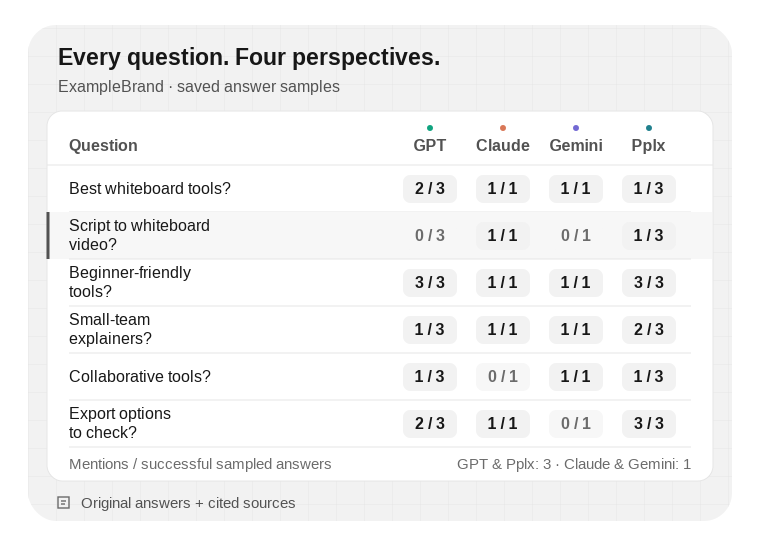
Comment suivre la visibilité de votre marque dans l’IA au fil du temps ?

Six questions d’acheteurs. Quatre perspectives.

QuestionChatGPTClaudeGeminiPerplexity
Which tools help monitor brand visibility in AI search?2 / 31 / 11 / 11 / 3
How can I track brand mentions in ChatGPT answers?0 / 31 / 10 / 11 / 3
How can a new website check its AI search visibility?3 / 31 / 11 / 13 / 3
How can a small team review sources cited in AI answers?1 / 31 / 11 / 12 / 3
How should a team compare AI visibility monitoring tools?1 / 30 / 11 / 11 / 3
What sampling limits should I check in an AI visibility plan?2 / 31 / 10 / 13 / 3

Mentions / réponses valides. Le nombre d’échantillons varie selon la plateforme.

Pourquoi les réponses d’IA peuvent-elles omettre votre marque ?

Un classement Google ne garantit aucune mention dans une réponse d’IA. Question, plateforme, sources disponibles et date influencent le résultat. Une absence invite à examiner les preuves, sans diagnostiquer votre site.

SEO et visibilité dans l’IA mesurent des résultats différents
Élément comparéSEOVisibilité dans l’IA / GEO
Où vous apparaissezPages dans les résultats de rechercheMentions de marque et liens sources dans les réponses d’IA
Ce que vous mesurezImpressions, clics et positionsMentions et citations dans les réponses collectées avec succès
Contexte utileRequête, marché, appareil et dateQuestion, IA, marché, langue, date et nombre d’échantillons
Points à examinerPertinence de la page et accès techniquePertinence de la réponse, concurrents et sources réellement citées

Accès au site, indexation, mentions, recommandations et citations sont des signaux distincts. Ni un site lisible ni une modification du contenu ne garantissent une recommandation d’IA.
Comment transformer les lacunes des réponses d’IA en contenu ?
03DE L’OBSERVATION À L’ACTION

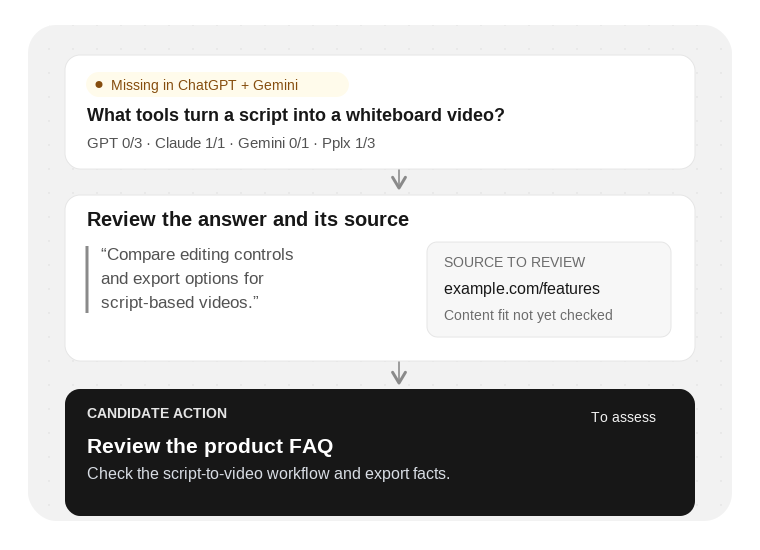
Comment transformer les lacunes des réponses d’IA en contenu ?

Examinez les preuves, puis choisissez votre prochaine action. Avec une offre payante éligible, créez un brouillon depuis une opportunité adaptée à votre site, une correction ou votre propre sujet, puis confirmez les détails avant la génération.

  • Examinez les mentions absentes et les pistes de sources externes avant d’agir.
  • Relisez et modifiez des brouillons fondés sur les réponses enregistrées et les faits confirmés.
  • Copiez ou exportez le Markdown et le HTML, puis publiez sur votre site.

Les pistes de contact pour les sources externes ne permettent pas de créer directement un brouillon. Vérifiez vous-même faits et liens : aucune vérification ni publication automatique, et aucune garantie de mention ou de citation.

Commencez gratuitement. Évoluez selon vos besoins.

L’aperçu anonyme pose 3 questions à ChatGPT une seule fois. Free inclut 9 questions de suivi ; les offres payantes ajoutent ChatGPT quotidien, Perplexity hebdomadaire et des brouillons. Growth et Scale ajoutent un groupe prioritaire commun à Claude et Gemini. Consultez les quotas dans les tarifs.

Voir les offres et tarifs
05LES BONNES QUESTIONS

Votre première vérification et la suite : vos questions.

Comprenez le périmètre gratuit, vos résultats et la différence entre SEO et visibilité dans l’IA.

Autres questions et réponses

Comment vérifier si ChatGPT mentionne ma marque ?

Saisissez votre site, vérifiez trois questions suggérées et confirmez la vérification gratuite. Chaque question reçoit une réponse ChatGPT ; lisez le texte original pour comprendre la description de votre marque sans assimiler toute mention à une recommandation.

Que comprend la vérification gratuite ?

L’aperçu anonyme inclut une vérification du site et trois questions ChatGPT, avec une réponse chacune. Les premiers résultats sont lisibles sans inscription. Le contrôle du site évalue l’accès et la lisibilité, sans prouver une indexation par l’IA.

D’où viennent les questions suggérées ?

Du contenu du site et de la description du produit que vous fournissez. Nous présélectionnons une question dans chacun des trois groupes d’intention ; vous pouvez choisir une alternative du même groupe ou modifier les questions avant de commencer. Si le site est illisible, fournissez une courte description.

Quelles plateformes d’IA puis-je suivre ?

Free suit 9 questions uniquement sur ChatGPT tous les 14 jours ; les offres payantes utilisent ChatGPT chaque jour et Perplexity chaque semaine, avec 1 réponse par question et plateforme à chaque vérification. Growth et Scale ajoutent Claude et Gemini tous les 14 jours, chacun fournissant 1 réponse par question du même groupe : 25 parmi les 100 de Growth ou 100 parmi les 250 partagées de Scale, sans questions supplémentaires ni groupes distincts par plateforme. Google AI Overviews n’est pas pris en charge.

Quelle différence entre mention, recommandation et citation ?

Une mention nomme la marque, une recommandation la conseille dans son contexte, et une citation renvoie à une page source. Le taux de mentions compte les réponses collectées avec succès qui nomment votre marque, pas les recommandations confirmées. Lisez le texte original et considérez la taille de l’échantillon avant de conclure.

Quelle différence entre SEO et GEO ?

Le SEO vise la visibilité dans les résultats de recherche ; le GEO s’intéresse à la présence des marques et sources dans les réponses d’IA. Tous deux bénéficient d’un contenu utile et accessible, mais un classement ne prouve aucune mention ou citation dans l’IA.

Que se passe-t-il après connexion et enregistrement ?

Connectez-vous pour conserver les questions et réponses existantes sans relancer la vérification. Ajoutez 2 questions dans chacune des 3 catégories : 6 nouvelles plus les 3 initiales, soit 9 au total. La connexion ou l’enregistrement ne lance pas automatiquement les 9 questions et n’active aucun calendrier.

Améliorer le contenu garantit-il mentions ou citations ?

Non. Modifier le contenu ne garantit ni mention, ni citation, ni classement dans les réponses d’IA. Promptvane aide à examiner les preuves et, avec une offre éligible, à créer des brouillons à modifier et exporter vous-même. Comparez les résultats suivants dans des conditions proches ; une réponse différente ne prouve pas sa cause.

VOTRE PROCHAIN CLIENT COMMENCE PEUT-ÊTRE PAR L’IA.

Découvrez où apparaît votre marque.

Vérifiez trois questions. Recevez une réponse ChatGPT par question. Premiers résultats sans inscription.

Vérifier ma marque gratuitement

Une réponse que vous pouvez examiner.

ChatGPT · Which tools help monitor brand visibility in AI search?

A useful shortlist starts with your workflow rather than a single “best” tool.

In this simulated answer, Promptvane appears alongside Tool A and Tool B as an option to investigate for choosing an AI brand visibility monitoring tool. Metrics, answers and sources are simulated for this interface demonstration, not actual platform recommendations or measured results.

Compare the steps you would actually repeat: choosing questions, reviewing sampled answers, comparing mentions, and inspecting cited sources.

Use a short trial project to check the product information against your own needs. The answer can suggest a starting point, but the linked evidence is what you should verify.

EXEMPLE DE FORMAT DE SOURCEhttps://g2.com/https://zapier.com/